Rideshare Driver Profit Reality Check
Real effective hourly take-home after true vehicle costs, vs local minimum wage · free, no signup
See Rideshare Driver Profit Reality Check in action
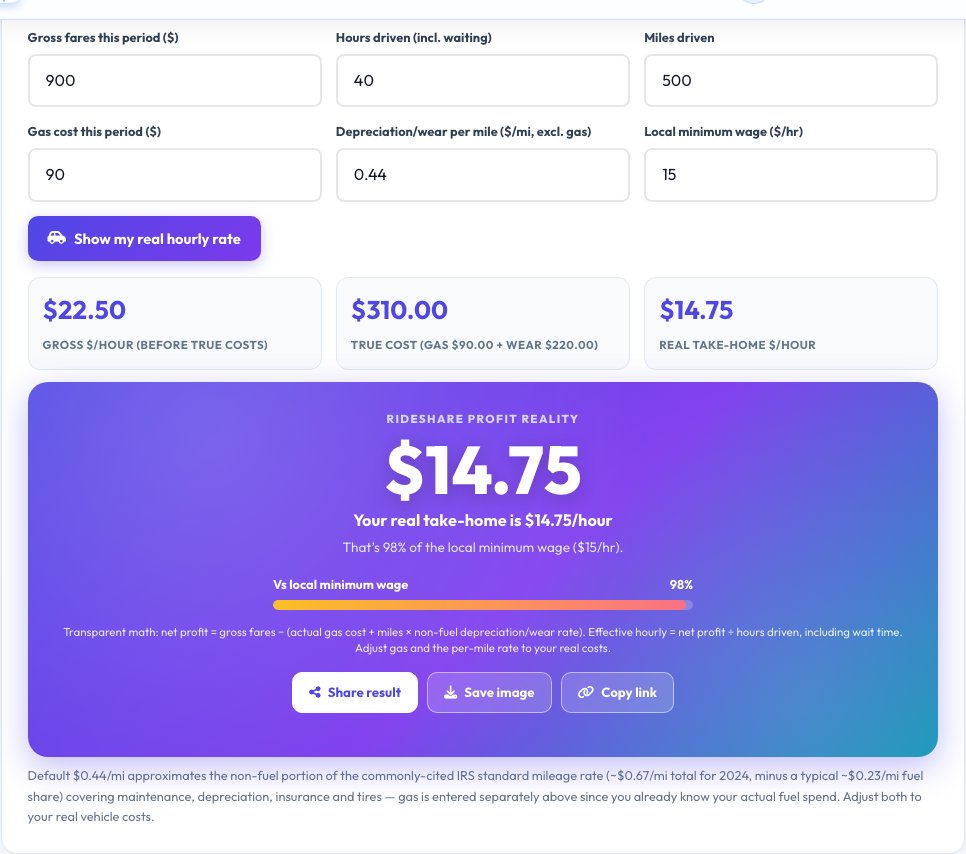
Rideshare Driver Profit Reality Check
Enter your gross fares for a period, hours driven including wait time, miles driven, your actual gas cost, and a depreciation/wear-and-tear rate per mile (defaulting to an amount derived from the commonly cited IRS standard mileage rate minus its typical fuel share, since you're entering gas separately).
The tool computes your true cost as gas plus miles × wear rate, subtracts that from gross fares for a real net profit, then divides by hours driven for your genuine effective hourly take-home — shown next to your gross hourly rate and compared to a local minimum wage you enter, so the gap between what you 'made' and what you actually kept is visible and correct.
Key features
Real, transparent math
Every line of the calculation is shown, not hidden.
True cost, not just gas
Includes a per-mile depreciation/wear estimate alongside your actual fuel spend.
Minimum-wage comparison
See your effective hourly rate as a percentage of local minimum wage.
Genuinely useful, not clickbait
Built to be accurate and auditable, even though the result can be a hard number to see.
How to use it
- Enter gross fares for the period.
- Enter hours driven, including wait time.
- Enter miles driven and your actual gas cost.
- Set the depreciation/wear rate per mile and your local minimum wage to see the real hourly comparison.
Worked example
Example
$900 in fares over 40 hours and 500 miles, $90 gas, $0.44/mile wear → true cost of about $310, net profit around $590, an effective hourly rate near $14.75.
Who uses this tool
Rideshare and delivery drivers
See the real hourly rate after vehicle costs, not just gross fares.
Anyone considering gig driving
A transparent way to evaluate whether it's worth it locally.
Journalists and researchers
A clear, auditable formula for gig-economy pay analysis.
Tips for the best results
- Use your actual gas receipts for the period, not an estimate, for the most accurate result.
- Adjust the per-mile wear rate to your specific vehicle's real maintenance and depreciation costs if you know them.
- Include all working hours, including time waiting for a ride request, for an honest hourly figure.
Common mistakes to avoid
- Only subtracting gas and ignoring vehicle wear and depreciation, which significantly overstates real profit.
- Excluding unpaid waiting time from 'hours driven', which inflates the effective hourly rate.
Why use AZRS QuickFix?
It is 100% free, needs no signup and has no watermark or usage limits. The tool runs in your browser, so what you type stays on your device, and it works on phones, tablets and desktops. New tools are added every week — bookmark this page or browse the full QuickFix toolbox.
Frequently asked questions
Where does the default per-mile rate come from?
It approximates the non-fuel portion of the commonly cited IRS standard mileage rate (covering maintenance, depreciation, insurance and tires), since gas is entered separately as your actual cost.
Why is my effective hourly lower than what the app showed me?
Rideshare apps typically show gross fares, not the true cost of operating your vehicle (fuel, wear, depreciation, insurance); this tool subtracts those to show what you actually keep.
Should I use my exact vehicle costs instead of the default rate?
Yes, if you know your actual per-mile maintenance, insurance and depreciation costs, enter that figure for a more precise result.
Is this tax advice?
No, it's an operational profit calculator, not tax, legal or accounting advice; consult a professional for tax treatment of vehicle expenses.
Is my data stored?
No, everything is calculated locally in your browser.
Can I use this for delivery driving too?
Yes, the same true-cost-per-hour math applies to any mileage-heavy gig driving work.