Chmod Permissions Calculator
Linux file permissions: octal, symbolic & commands · free, no signup
| Read (4) | Write (2) | Execute (1) | |
|---|---|---|---|
| Owner (user) | |||
| Group | |||
| Others (world) |
See Chmod Permissions Calculator in action
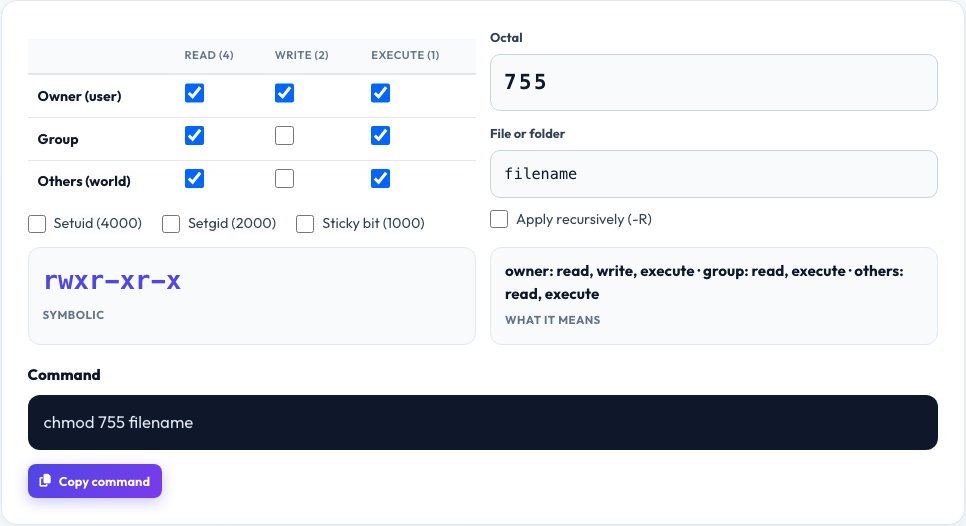
Free Chmod Calculator — Linux File Permissions Made Simple
On Linux, macOS and other Unix systems every file has permissions for three classes of user — the owner, the group and everyone else — and each class can be allowed to read (r), write (w) and execute (x). The chmod command changes them, usually with a three-digit octal number such as 755 or 644.
This calculator lets you tick the boxes and instantly see the octal value, the symbolic form (like rwxr-xr-x) and the exact chmod command. You can also type an octal value to see which boxes it represents. It is a quick way to get web server, SSH key and script permissions right and avoid security mistakes.
Key features
Visual checkboxes
Read, write and execute for owner, group and others.
Octal and symbolic
755 and rwxr-xr-x shown together.
Command generator
Copy the chmod command for your file.
Special bits
Setuid, setgid and sticky bit supported.
How to use it
- Tick the permissions for owner, group and others.
- Read the octal number and symbolic string.
- Or type an octal number to see the boxes.
- Copy the generated chmod command.
Worked example
Example
755 = rwxr-xr-x → owner can read, write, execute; group and others can read and execute
644 = rw-r--r-- → owner can read and write; everyone else can only read
Who uses this tool
Web developers and sysadmins
Set safe permissions on websites and servers.
Students
Learn how Unix permissions work.
DevOps engineers
Generate commands for scripts and pipelines.
Tips for the best results
- Use 644 for files and 755 for directories on most web servers.
- SSH private keys should be 600.
- Avoid 777 — it lets everyone modify the file.
- Use -R carefully; it changes everything inside a folder.
Common mistakes to avoid
- Making files world-writable (777) to “fix” an error.
- Forgetting that directories need execute permission to be entered.
- Confusing the order: owner, group, others.
Why use AZRS QuickFix?
It is 100% free, needs no signup and has no watermark or usage limits. The tool runs in your browser, so what you type stays on your device, and it works on phones, tablets and desktops. New tools are added every week — bookmark this page or browse the full QuickFix toolbox.
Frequently asked questions
What does chmod 755 mean?
Owner can read, write and execute; group and others can read and execute.
What does chmod 644 mean?
Owner can read and write; group and others can only read.
How are the octal numbers calculated?
Read = 4, write = 2, execute = 1; add them for each class.
What is the sticky bit?
On a directory, it lets only the file’s owner delete it — used on /tmp.
Why is 777 dangerous?
Anyone on the system can change or replace the file.
Is it free?
Yes.