Function to Plot
Data Set (comma separated)
ax + b = 0
ax² + bx + c = 0
ax³ + bx² + cx + d = 0
a₁x + b₁y = c₁ & a₂x + b₂y = c₂
Operands
Single Operand
Free Scientific Calculator Online 2026 — 10 Modes
The AZRS Scientific Calculator is a free, browser-based calculator with 10 fully-featured modes — Scientific, Basic, Graphing, Programmer, Statistics, Matrix, Unit Converter, Equation Solver, Complex Numbers, and Finance. No download, no signup, no watermarks. Use it directly at azrscorp.com on any device.
Scientific Calculator
sin, cos, tan, log, ln, √, π, e, x², powers, memory. Degrees, Radians, Gradians.
Open Scientific Calculator →Basic Calculator
Fast, simple arithmetic — add, subtract, multiply, divide with percentage support.
Open Basic Calculator →Graphing Calculator
Plot any function, zoom/pan, visualize equations instantly in the browser.
Open Graphing Calculator →Programmer Calculator
Hex, Binary, Octal, Decimal. Bitwise AND, OR, XOR, NOT, left/right shifts.
Open Programmer Calculator →Statistics Calculator
Mean, median, mode, standard deviation, variance, z-score and more.
Open Statistics Calculator →Matrix Calculator
Add, subtract, multiply matrices. Determinant, inverse, transpose — up to 4×4.
Open Matrix Calculator →Unit Converter
16 unit categories: length, weight, temperature, speed, time, volume and more.
Open Unit Converter →Equation Solver
Solve linear, quadratic, and cubic equations with instant step-by-step results.
Open Equation Solver →Complex Numbers
Add, subtract, multiply, divide complex numbers. Polar ↔ rectangular conversion.
Open Complex Numbers →Finance Calculator
Compound interest, loan EMI, ROI, NPV, CAGR — all in one finance calculator.
Open Finance Calculator →Frequently Asked Questions
Is this scientific calculator free? +
Yes, 100% free. No signup, no download, no watermarks. All 10 modes are available instantly at AZRS Corp.
What modes does the AZRS calculator have? +
10 modes: Scientific, Basic, Graphing, Programmer (hex/binary/octal), Statistics, Matrix, Unit Converter, Equation Solver, Complex Numbers, and Finance.
Can I use it as a graphing calculator online? +
Yes. Switch to Graphing mode to plot any function and visualize equations instantly — no download required.
Does it support hex and binary? +
Yes. Programmer mode supports Hex, Binary, Octal, and Decimal plus bitwise operations (AND, OR, XOR, NOT, shifts).
Can I calculate sin, cos, and tan online? +
Yes. Scientific mode includes sin, cos, tan, asin, acos, atan with Degrees, Radians, and Gradians toggle.
Does it save my calculation history? +
Logged-in users can save and view full history. Guests see session history in the sidebar panel.
Is it mobile-friendly? +
Yes. Fully responsive — works perfectly on all phones, tablets, and desktops.
Can I solve quadratic equations online? +
Yes. Open Equation Solver mode and enter your coefficients. It instantly solves linear, quadratic, and cubic equations.
See Free Scientific Calculator in action
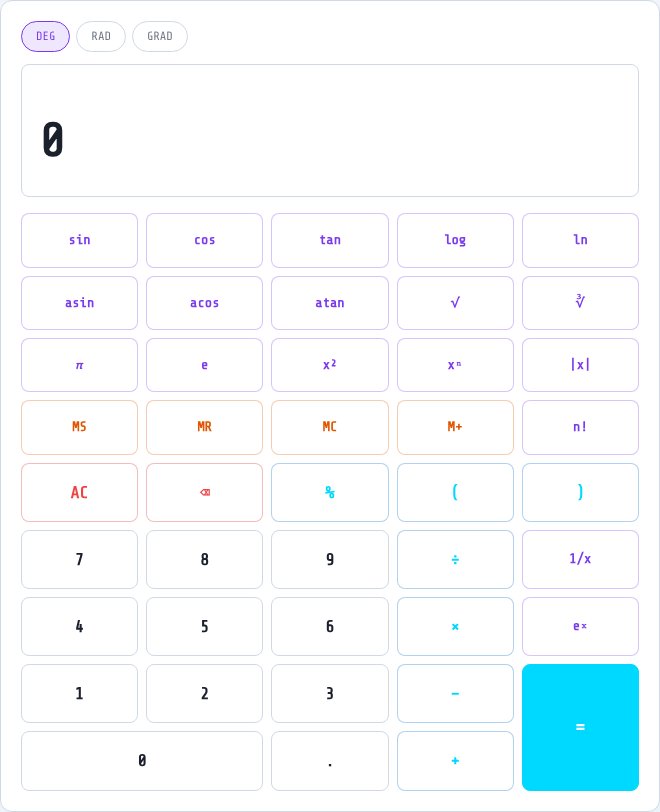
Free Scientific Calculator
A full scientific calculator in your browser, covering everything from basic arithmetic to trigonometry, logarithms, exponents, statistics, matrices and unit conversion — switchable between modes without leaving the page. Type an expression or use the on-screen keypad, and results calculate instantly.
Multiple modes are available from the same tool: basic, scientific, graphing, programmer, statistics, matrix, converter, equation, complex and finance — so whether you need a quick square root or a matrix determinant, it's all in one place.
Key features
Multiple calculator modes
Switch between basic, scientific, programmer, statistics, matrix and more from one interface.
Full function set
Trigonometry, logarithms, exponents, roots, factorials and constants like π and e.
Keeps a history
Review and reuse previous calculations without retyping them.
Works on any device
Full keypad on desktop, touch-friendly layout on mobile.
How to use it
- Choose the calculator mode you need (scientific, programmer, statistics, etc).
- Type an expression or tap the on-screen keys.
- Press equals or let it evaluate live to see your result.
- Check your calculation history to reuse previous results.
Worked example
Example
In scientific mode, entering sin(45) with degree mode selected returns approximately 0.7071, and log(1000) returns 3.
Who uses this tool
Students
Handle trigonometry, algebra and statistics homework in one tool instead of switching apps.
Engineers and professionals
Quick access to scientific functions, matrix operations and unit conversions.
Anyone needing more than basic arithmetic
Square roots, powers, logs and trig functions without a physical calculator.
Tips for the best results
- Check whether you're in degree or radian mode before running trigonometric functions — a wrong mode gives a wildly different answer.
- Use the history panel to chain calculations without re-entering previous results by hand.
- Switch to matrix mode for linear algebra instead of manually multiplying matrices term by term.
- The programmer mode is useful for quick binary, octal and hexadecimal conversions without a separate tool.
Common mistakes to avoid
- Leaving the calculator in radian mode while expecting degree-based trig results, or vice versa.
- Forgetting order of operations when typing a long expression — use parentheses to be explicit.
- Using basic mode for something that needs scientific or matrix mode, and getting an incomplete result.
Why use AZRS QuickFix?
It is 100% free, needs no signup and has no watermark or usage limits. The tool runs in your browser, so what you type stays on your device, and it works on phones, tablets and desktops. New tools are added every week — bookmark this page or browse the full QuickFix toolbox.
Frequently asked questions
Is this scientific calculator free?
Yes, completely free with no signup required.
Does it support degrees and radians?
Yes, you can switch between degree and radian mode for trigonometric functions.
Can it do matrix operations?
Yes, switch to matrix mode for operations like determinants, addition and multiplication.
Does it save my calculation history?
Yes, recent calculations are kept in a history panel you can revisit.
Can I use it on my phone?
Yes, the layout is fully responsive with a touch-friendly keypad.
Is my calculation data private?
Yes, calculations are processed and not shared publicly.