Browser Feature & Codec Support Test
See which web features, video/audio codecs and image formats your browser supports · free, no signup
See Browser Feature & Codec Support Test in action
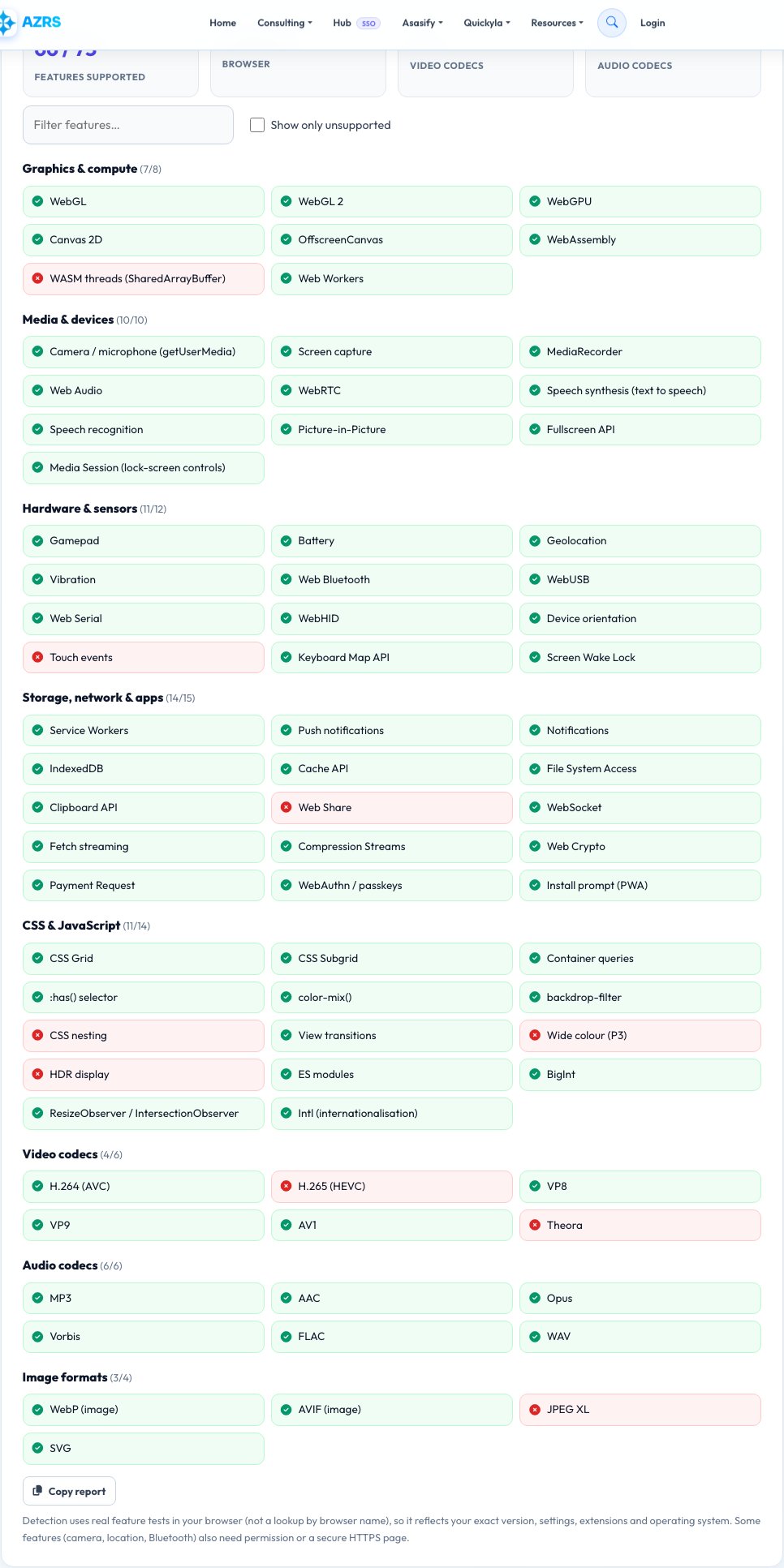
Browser Feature and Codec Support Test
Whether a website, web app or video will work depends on what your browser supports. This test checks more than 70 real capabilities on your device and shows a green tick or red cross for each: graphics (WebGL, WebGL 2, WebGPU, WebAssembly), media and devices (camera, microphone, screen capture, MediaRecorder, speech), sensors and hardware (gamepad, battery, Bluetooth, USB, geolocation), storage and network features (service workers, notifications, IndexedDB, File System Access, WebAuthn passkeys) and modern CSS such as subgrid, container queries and :has().
It also tests playback support for video codecs (H.264, H.265/HEVC, VP8, VP9, AV1), audio codecs (MP3, AAC, Opus, FLAC and others) and image formats (WebP, AVIF, JPEG XL). Because each test runs in your own browser, the results reflect your exact version, operating system, hardware and settings — not a lookup table by browser name.
Key features
70+ real feature tests
Graphics, media, sensors, storage, CSS and JavaScript.
Codec support
H.264, HEVC, VP9, AV1, MP3, AAC, Opus, FLAC.
Image formats
WebP, AVIF, JPEG XL and SVG decode tests.
Filter and copy
Show only what is missing and copy the report.
How to use it
- Open the page — the tests run automatically.
- Check the score and the codec counts at the top.
- Use the filter to find a feature or show only unsupported items.
- Copy the report to send to a developer or support.
Worked example
Example
Chrome 126 · 68 / 75 features · H.264 ✓ HEVC ✗ VP9 ✓ AV1 ✓ · AVIF ✓ WebP ✓ JPEG XL ✗.
Who uses this tool
Web developers and QA
Check which APIs exist on a device before relying on them.
Video and streaming users
Find out whether AV1 or HEVC will play smoothly.
Support teams
Get an exact capability report from a customer.
Tips for the best results
- Update your browser to get the newest features.
- Enable hardware acceleration in settings if WebGL or video codecs are missing.
- Some features only work on HTTPS pages.
- Compare browsers by opening this page in each one.
Common mistakes to avoid
- Judging support by browser name and version alone.
- Forgetting that a feature can be present but blocked by permission.
- Disabled hardware acceleration hiding WebGL and codecs.
Why use AZRS QuickFix?
It is 100% free, needs no signup and has no watermark or usage limits. The tool runs in your browser, so what you type stays on your device, and it works on phones, tablets and desktops. New tools are added every week — bookmark this page or browse the full QuickFix toolbox.
Frequently asked questions
How accurate is the detection?
The page runs real feature tests in your browser, so it reflects your actual setup.
Why is HEVC or AV1 missing?
Codec support depends on the browser and often on your hardware or operating-system codecs.
What is WebGPU?
A modern graphics and compute API that will replace WebGL for games, AI and heavy graphics.
Why does a feature show unsupported but I know it exists?
It may be disabled by a flag, an extension, enterprise policy or a non-secure page.
Is anything sent to your servers?
No. All tests run locally.
Can I share the result?
Yes — Copy report creates a plain-text list.