3D Text & QR Code STL Generator
Make 3D text signs, keychains and scannable QR code plates as STL · free, no signup
See 3D Text & QR Code STL Generator in action
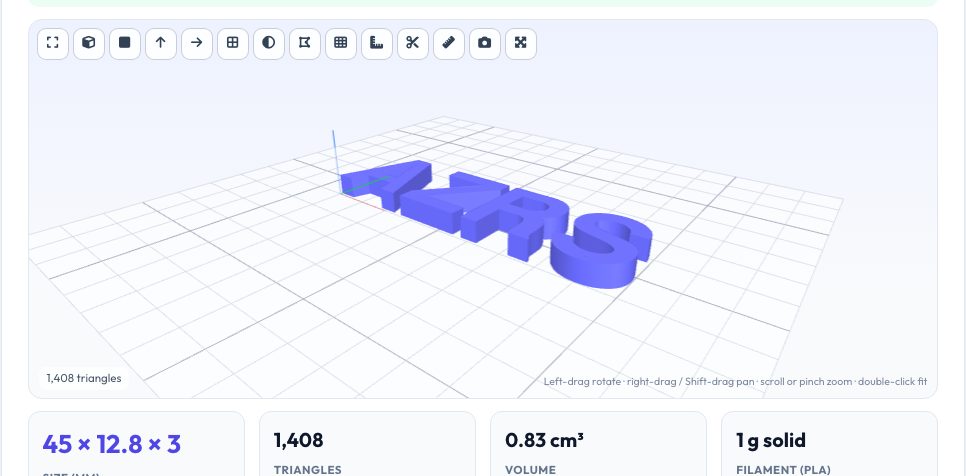
Free 3D Text & QR Code STL Generator
The text tab turns any text into raised 3D lettering using real outline fonts, with the letter height, thickness and a choice of base — none (separate letters), rectangle, rounded plate or a keychain plate with a ring hole. The QR tab encodes any text or URL (including Wi-Fi strings or contact cards) into a printable QR plate: pick the error-correction level, the size of each module in millimetres, the height of the raised code, the quiet zone and the plate thickness; you can raise the light modules instead of the dark ones for the opposite polarity.
Both tabs preview the result in 3D with size and volume, and export STL or 3MF. For a scannable code, print it flat with the code facing up, in contrasting colours — for example a white plate and a black raised code made with a filament change at the code layer — and test it with a phone before using it.
Key features
3D text
Outline fonts, size, thickness, base plate and keychain hole.
QR code plate
Any text or URL with error correction, module size, quiet zone and height.
Live 3D preview
Size, volume and filament estimate before downloading.
STL & 3MF
Closed meshes ready to slice.
How to use it
- Pick Text or QR.
- Enter your text or URL and set size and thickness.
- Choose the base plate (and keyring hole for keychains).
- Download the STL/3MF and print flat.
Worked example
Example
A QR code for https://azrscorp.com at 1.2 mm modules (25 × 25) with a 3-module quiet zone makes a 37.2 mm square plate with 0.8 mm raised code; “AZRS” in 12 mm letters is about 45 mm wide, or roughly 65 × 21 mm on a keychain plate.
Who uses this tool
Makers and gift sellers
Name signs, door plaques and keychains.
Small businesses
Printed QR codes for menus, Wi-Fi and links.
Teachers
Show how QR modules map to geometry.
Tips for the best results
- Keep QR modules at least 0.8 mm for a 0.4 mm nozzle.
- Use higher error correction if the plate may get scratched.
- Make text strokes at least 1.2 mm thick for strength.
- Always test-scan before mass-producing.
Common mistakes to avoid
- Printing a QR code with low contrast between plate and code.
- Using a quiet zone smaller than 2 modules.
- Making letters too thin or tall for the plate.
Why use AZRS QuickFix?
It is 100% free, needs no signup and has no watermark or usage limits. The tool runs in your browser, so what you type stays on your device, and it works on phones, tablets and desktops. New tools are added every week — bookmark this page or browse the full QuickFix toolbox.
Frequently asked questions
Which fonts are available?
Helvetica Bold/Regular and Optima Bold (outline fonts).
How big should a QR code be?
At least 2 × 2 cm for phone scanning at arm's length; larger for distance.
Can it encode Wi-Fi details?
Yes — enter WIFI:T:WPA;S:name;P:password;; as the text.
Is my text sent anywhere?
No — everything is generated in your browser.