Business Card Maker
Design and download a print-ready business card · free, no signup
See Business Card Maker in action
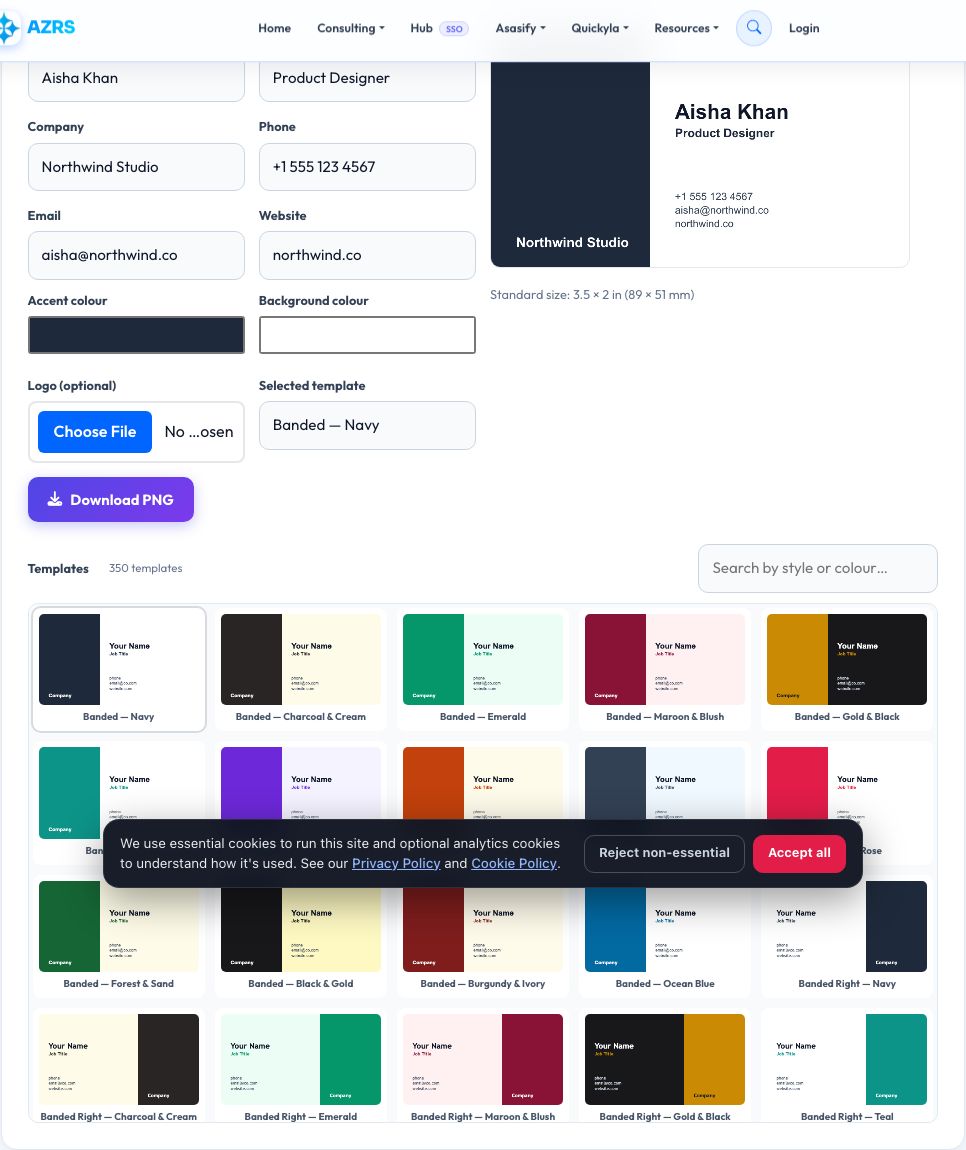
Free Business Card Maker
Browse a gallery of 350 templates — 25 genuinely different layout designs — banded, wave, ribbon, ticket-stub, hexagon badge, monogram, watermark, viewfinder corners and more — each available in 14 curated colour palettes, from navy-and-white to gold-and-black. Pick one, then fill in your name, job title, company, phone, email and website and see a live preview of a standard business card (3.5 × 2 inches / 89 × 51 mm at print resolution).
When you are happy with it, download a high-resolution PNG ready to send to a print shop or upload to an online printer. Everything is drawn on a canvas in your browser, so your details are never uploaded, and there is no watermark or account required.
Key features
350 templates
25 layout designs × 14 colour palettes, browsable in a searchable gallery.
Print-ready size
3.5×2 in (89×51 mm) at 300 DPI equivalent resolution.
Logo upload
Add your own logo image to the card.
High-res PNG download
Ready for a print shop or business-card printer.
How to use it
- Browse the template gallery and click one you like.
- Enter your name, title, company and contact details.
- Fine-tune the colours or add a logo if you want.
- Download the PNG and send it to print.
Worked example
Example
Name: Aisha Khan · Title: Product Designer · Company: Northwind Studio → the "Banded — Navy" template, downloaded as a 1050×600px PNG.
Who uses this tool
Freelancers and small business owners
A professional card without hiring a designer.
Startups
Quickly produce cards for a new team or event.
Students and job seekers
A simple networking card for career fairs.
Tips for the best results
- Keep text short — a business card has very little room.
- Use a high-resolution logo (at least 300×300px) so it prints sharply.
- Choose a template whose palette already has strong contrast rather than fighting the colours afterward.
- Check your local printer's exact bleed and size requirements before ordering a large batch.
Common mistakes to avoid
- Using a low-resolution or blurry logo image.
- Cramming too many details onto one small card.
- Forgetting to double-check contact details before printing hundreds of cards.
Why use AZRS QuickFix?
It is 100% free, needs no signup and has no watermark or usage limits. The tool runs in your browser, so what you type stays on your device, and it works on phones, tablets and desktops. New tools are added every week — bookmark this page or browse the full QuickFix toolbox.
Frequently asked questions
How many templates are there?
350 — 25 genuinely different layout designs (banded, wave, ribbon, ticket-stub, hexagon badge, watermark, viewfinder corners, monogram and more) each in 14 colour palettes. Search the gallery by style or colour name.
What size is a standard business card?
3.5 × 2 inches (89 × 51 mm) in the US, which this tool uses by default.
Can I add my own logo?
Yes, upload a PNG or JPG logo and position it on the card.
What resolution is the download?
The PNG is generated at a high resolution suitable for professional printing.
Is this free to use commercially?
Yes, cards you create are entirely yours to print and use.
Can I make a double-sided card?
Design and download the front, then switch details and download a second image for the back.
Is my information sent anywhere?
No. The card is drawn locally in your browser and only leaves your device when you download it.