Meeting Cost Calculator
See the real running cost of a meeting, live, based on attendee count and pay rates — a real number, not an abstraction · free, no signup
How Meeting Cost Calculator works, step by step
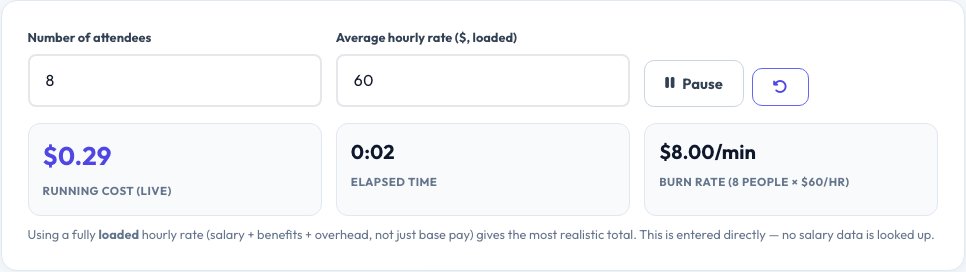
Enter the number of attendees and their average hourly rate (or set individual rates).
 Download it
Click Start when the meeting begins.
Meeting Cost Calculator
'This meeting could have been an email' is easy to say and hard to act on without a real number attached. This tool turns attendee count and average hourly pay into a real, live-ticking dollar figure: enter how many people are in the meeting and their average hourly rate (or set individual rates for a more precise total), start the timer when the meeting begins, and watch the actual running cost increase in real time for the rest of the call.
At the end, you get a real total cost for exactly how long the meeting ran — a concrete number that makes the true cost of a meeting running long, starting late, or including unnecessary attendees immediately visible, rather than an abstract sense that 'meetings are expensive'.
Key features
Real live running total
Watch the actual dollar cost tick up in real time for as long as the meeting runs, not just a static estimate.
Simple average-rate or per-person rate mode
Use one average hourly rate for speed, or set individual rates for a precise real total.
Pause and resume
Pause the timer for a break and resume without losing the accumulated real cost.
Clear final total
Stop the timer at the end to see the meeting's exact real total cost for that exact duration.
How to use it
- Enter the number of attendees and their average hourly rate (or set individual rates).
- Click Start when the meeting begins.
- Watch the real running cost tick up live for the duration of the meeting.
- Click Stop at the end to see the exact real total cost.
Worked example
Example
An 8-person meeting with an average loaded hourly rate of $60 running for 45 minutes racks up a real cost of $360 by the time it ends — a concrete number that changes the conversation about whether that meeting needed to be 45 minutes, or needed all 8 people.
Who uses this tool
Managers deciding whether a recurring meeting is worth its real cost
See a concrete number to weigh against the meeting's actual output.
Teams trying to run meetings more efficiently
Make the real cost of running long or starting late visible in the room.
Anyone building a business case for fewer or shorter meetings
Use a real calculated total, not a vague argument, to make the point.
Tips for the best results
- Use a fully loaded hourly rate (salary plus benefits and overhead, not just base pay) for a more realistic total, since that's closer to what an hour of someone's time actually costs an organization.
- The live-running total is most useful displayed during the meeting itself as a visible, real-time reminder — screen-share or display it if you want it to actually change behavior.
- Individual per-person rates give a more accurate total than one average rate when attendees have very different pay levels, like a meeting mixing junior staff and senior executives.
Common mistakes to avoid
- Using only base salary instead of a loaded rate, which understates the real total cost of everyone's time to the organization.
- Calculating cost only after the fact from a vague duration guess instead of running the live timer, which loses the real-time visibility that makes the number actually change behavior in the room.
- Treating the number as a judgment on any single meeting rather than a tool for noticing patterns — an expensive but genuinely valuable meeting is a different situation from an expensive, low-value recurring one.
Why use AZRS QuickFix?
It is 100% free, needs no signup and has no watermark or usage limits. The tool runs in your browser, so what you type stays on your device, and it works on phones, tablets and desktops. New tools are added every week — bookmark this page or browse the full QuickFix toolbox.
Frequently asked questions
Where does the hourly rate come from?
You enter it directly — either one average rate applied to every attendee, or individual rates per person for a more precise total; the tool doesn't look up anyone's real salary.
What does 'loaded hourly rate' mean and should I use it?
It means salary plus the real added cost of benefits, taxes and overhead, not just base pay — using a loaded rate gives a more realistic total cost figure, though a simple base-pay rate still gives a useful relative comparison between meetings.
Does the cost update live while the meeting runs?
Yes — once started, the total ticks up in real time for as long as the timer runs, including support for pausing and resuming without losing the accumulated total.
Can I use different rates for different attendees?
Yes, individual per-person rate mode is available for a more precise total when attendees have significantly different pay levels.
Is this meant to discourage all meetings?
No — it's meant to make the real cost visible so that decision can be made deliberately, the same way a real budget number changes a spending conversation.
Is my data stored?
No, all figures are entered and calculated locally in your browser.