G-code Viewer & Print Time Estimator
3D + 2D G-code preview by feature, speed and layer, with time and flow stats · free, no signup
See G-code Viewer & Print Time Estimator in action
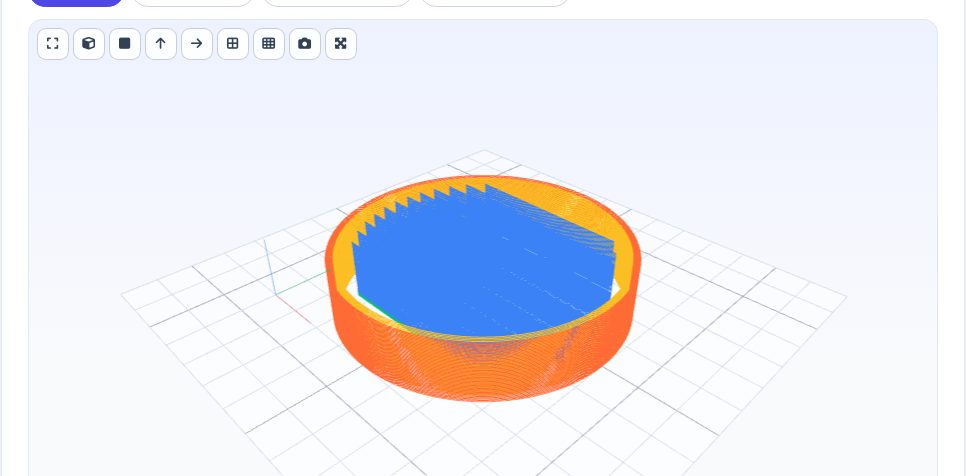
Free G-code Viewer & Print Time Estimator
A sliced .gcode file is the exact set of moves your printer will make. This viewer parses every G0/G1/G2/G3 move in a background thread (so the page stays smooth even on million-line files), detects layers from the slicer's own markers (or from Z moves), recognises feature types written by Cura, PrusaSlicer, OrcaSlicer, Bambu Studio and SuperSlicer, and shows the print in a 3D view you can orbit, with a layer-range slider, an in-layer scrub slider, an animate button and colouring by feature type, speed or height. A 2D layer view and per-layer time and feature charts complete the picture.
The statistics come from the actual moves: real filament length and weight (any diameter and material), the slicer's own time estimate when present plus our own acceleration-aware estimate (a look-ahead planner with junction deviation), maximum and 99th-percentile volumetric flow in mm³/s (so you can check your hotend's limit), retractions, travel share, temperatures, fan and the slicer settings found in the file.
Key features
Smooth 3D preview
Orbit the toolpath, layer range + scrub slider, animate, travel moves on/off.
Colour by feature / speed / height
See walls, infill, support, bridges, skin and speed at a glance.
Real stats
Filament length and weight, time (slicer + acceleration-aware), flow in mm³/s, retractions.
Fast & private
Parsed in a worker thread in your browser; arcs (G2/G3) supported.
How to use it
- Drop in or choose a .gcode (or .gco / .nc) file.
- Use the layer slider or press Play to step through the real toolpath.
- Read the real filament length, estimated weight and layer count.
- Check the estimated print time and print bounding box.
Worked example
Example
A 2-hour benchy .gcode file parses into 220 layers, a bounding box of 60 × 31 × 48 mm, 3.1 m of filament (about 9.3 g in PLA), and a print time of 1h 58m read directly from the slicer's own embedded time comment.
Who uses this tool
Makers double-checking a file before sending it to print
Confirm the real dimensions, filament use and estimated time match what was intended.
Anyone sharing G-code who wants a quick visual without opening a slicer
Preview the real toolpath and stats directly in the browser.
People troubleshooting a failed print
Step through the real layer-by-layer path to spot where travel moves or extrusion look wrong.
Tips for the best results
- When a slicer's own embedded time comment is available, it is shown and used as the headline estimate, since it accounts for acceleration and jerk settings that a simple feedrate-and-distance calculation cannot.
- The fallback time estimate (used only when no slicer comment is found) integrates real feedrate against real travel distance per move, so it is a reasonable planning number but will typically run a little faster than a real print, which also spends time accelerating, decelerating and on non-modeled pauses.
- Very large multi-part or vase-mode files can have a very high layer count — use the slider to jump directly to a layer instead of stepping through one by one.
Common mistakes to avoid
- Assuming the fallback time estimate (when no slicer comment exists) will exactly match the real printer clock — it ignores acceleration/jerk and any pauses, so treat it as an approximation.
- Confusing travel moves (non-extruding repositioning) with the actual printed path when reading the toolpath view — only extruding moves represent real deposited material.
- Loading a non-G-code text file and expecting meaningful stats — the parser looks for real G0/G1/G92 motion commands, and a file without them will show empty results.
Why use AZRS QuickFix?
It is 100% free, needs no signup and has no watermark or usage limits. The tool runs in your browser, so what you type stays on your device, and it works on phones, tablets and desktops. New tools are added every week — bookmark this page or browse the full QuickFix toolbox.
Frequently asked questions
Does it support arc moves (G2/G3)?
Yes — arcs are approximated by short segments so Klipper/Prusa/Orca arc-fitted files display correctly.
What about binary G-code (.bgcode)?
Export plain ASCII G-code from your slicer; binary .bgcode is not supported.
How is the time estimate calculated?
From a Marlin-style look-ahead planner using the file's acceleration (or a default you can change in the estimator tool), shown next to the slicer's own estimate.
What file types are supported?
Plain-text G-code: .gcode, .gco, .nc and .txt exports from common FDM slicers.
Is the print time exact?
When the slicer embedded its own time estimate as a comment, that figure is used and is generally close to the real print time. Without one, the time is estimated from real feedrate and distance and tends to run a little faster than the real print.
How is filament length calculated?
From the real cumulative extrusion (E-axis) values across every extruding move, correctly handling both absolute (M82) and relative (M83) extrusion modes.
Does it support resin/SLA G-code or other non-FDM formats?
No — this parses FDM-style G0/G1 motion and E-axis extrusion G-code specifically.
Is my file uploaded anywhere?
No. Parsing and rendering happen entirely in your browser; the file is never sent to a server.
Can it handle very large G-code files?
Yes, though files with several million lines may take a few seconds to parse before the viewer becomes interactive.