JavaScript Minifier & Beautifier
Strip comments and excess whitespace from JavaScript, or re-indent minified code to read it · free, no signup
How JavaScript Minifier & Beautifier works, step by step
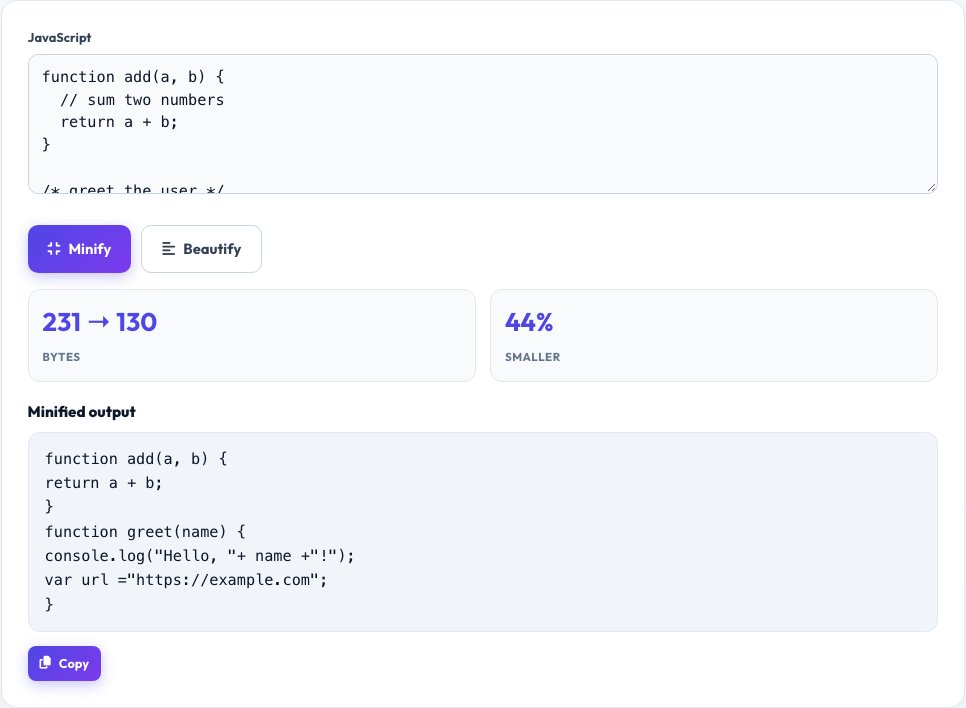
Paste your JavaScript.
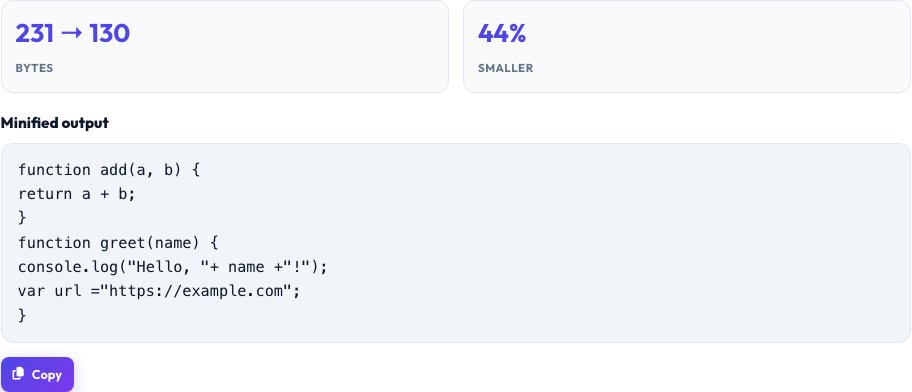 Download it
Choose Minify or Beautify.
Free JavaScript Minifier & Beautifier
Minify mode shrinks your JavaScript by removing <code>//</code> line comments and <code>/* */</code> block comments and collapsing unnecessary whitespace and blank lines — safely, using a real tokenizer that understands strings, template literals and regular expression literals, so a <code>//</code> inside a string or URL is never mistaken for a comment and stripped by accident. This is an honest whitespace-and-comment minifier: it does not rename variables or restructure logic the way a build-tool minifier like Terser does, so the output behaves identically to the input, just smaller.
Beautify mode does the reverse: paste dense, minified or poorly formatted JavaScript and get it re-indented with consistent spacing around braces, so you can actually read and debug it — useful when inspecting a third-party script or a minified file you need to understand.
Key features
Tokenizer-aware minify
Correctly skips strings, template literals and regex literals so comment-stripping never corrupts code.
Safe by design
Removes comments and whitespace only — never renames variables or changes logic.
Beautify mode included
Re-indent minified or messy JS to read it properly.
See the size saved
Shows before/after byte size and percentage reduction.
How to use it
- Paste your JavaScript.
- Choose Minify or Beautify.
- Review the result and the size comparison.
- Copy or download the output.
Worked example
Example
function add(a,b){\n // sum two numbers\n return a + b;\n}\n -> minified: function add(a,b){return a+b;}Who uses this tool
Developers shipping a small script
Shrink a standalone JS file without setting up a full build pipeline.
Anyone debugging a minified third-party script
Beautify it first to actually read the logic.
Students learning JavaScript
See exactly what comment/whitespace removal does to real code.
Tips for the best results
- This is a comment-and-whitespace minifier, not a full build-tool minifier — for maximum size reduction with variable renaming on a large production app, a real bundler (esbuild, Terser, webpack) is still the right tool.
- Always test minified output before deploying — while this tool is careful about strings and regex literals, any minifier can interact unexpectedly with unusual edge-case syntax.
- Beautify mode is for reading, not for restoring original variable names or comments that a real minifier already removed — those are gone permanently once stripped.
Common mistakes to avoid
- Assuming any minifier guarantees zero risk — always diff-test minified output against the original before shipping to production.
- Expecting beautify mode to undo full build-tool minification (renamed variables, removed comments) — it can only re-indent, not un-rename.
- Minifying code that's already been through a real bundler expecting further size gains — most of the safe whitespace savings will already be gone.
Why use AZRS QuickFix?
It is 100% free, needs no signup and has no watermark or usage limits. The tool runs in your browser, so what you type stays on your device, and it works on phones, tablets and desktops. New tools are added every week — bookmark this page or browse the full QuickFix toolbox.
Frequently asked questions
Does this rename variables like Terser or UglifyJS?
No — this is an honest comment-and-whitespace minifier only. It shrinks file size safely without changing any identifier names or program logic.
Is it safe to strip comments containing URLs or code samples?
Yes — the tokenizer tracks string and template literal boundaries, so text that looks like a comment marker inside a string is never touched.
Can it minify JSX or TypeScript?
It's designed for plain JavaScript; JSX/TypeScript-specific syntax may not tokenize correctly since those require a language-aware parser.
Why would I beautify code instead of just reading it minified?
Minified code has no line breaks or indentation, making control flow nearly impossible to follow visually — beautifying restores readable structure.
Is my code uploaded anywhere?
No, everything runs locally in your browser.
Is this free?
Yes, unlimited use, no signup.