3D Print Tolerance & Clearance Test Generator (STL)
Generate a numbered test plate with holes of increasing clearance and matching pegs to dial in your printer's fit · free, no signup
See 3D Print Tolerance & Clearance Test Generator (STL) in action
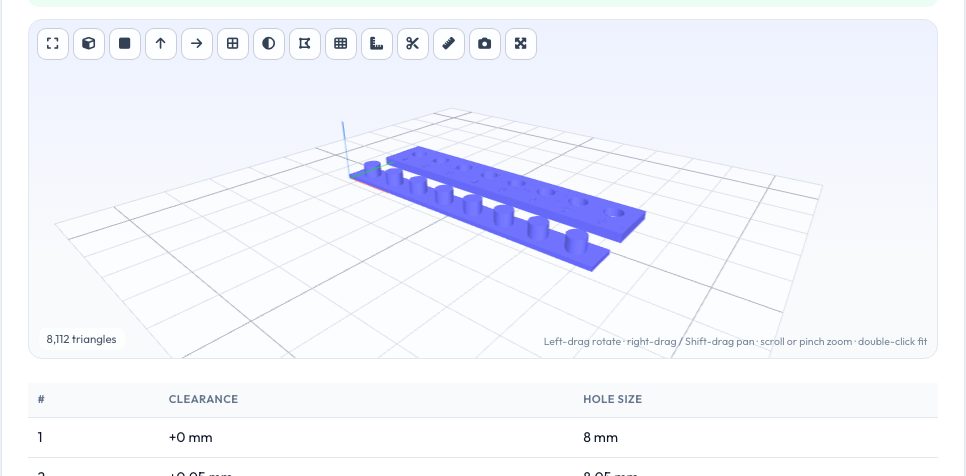
Free 3D Print Tolerance & Clearance Test Generator
Why does an 8 mm hole print as 7.8 mm? Printers over-extrude, plastic shrinks and round holes polygon-ise, so every printer and material needs its own hole offset. This generator creates a plate with a row of holes at your nominal size plus increasing clearance (for example 0, 0.05, 0.10 … 0.35 mm), with numbers raised beside each hole and a matching plate of pegs at the nominal size.
Print it with your usual settings, try the pegs or your real bolt, magnet or shaft in each hole, and note the first one that fits the way you want. The table gives each hole's exact size. Use that clearance in every future design.
Key features
Round, square or hex holes
Bolts, nuts, magnets and rods.
Adjustable steps
Start, step and number of holes.
Numbered labels
Raised numbers beside the holes.
Matching pegs
Optional peg plate.
How to use it
- Enter the nominal size and clearance range.
- Generate and download the plate.
- Print with your normal settings.
- Test fit and note the winning hole.
Worked example
Example
A nominal 8 mm test from 0 to 0.35 mm in 0.05 mm steps gives holes of 8.00 to 8.35 mm; on a typical 0.4 mm FDM printer hole 3 (8.10 mm) is a snug press fit and hole 5 (8.20 mm) slides freely.
Who uses this tool
FDM users
Dial in fits for your printer.
Resin users
Find shrink offsets.
Designers
Standard clearances.
Teachers
Teach tolerance concepts.
Tips for the best results
- Print with the same material and settings as the real part.
- Print slowly for a more accurate hole.
- Remember horizontal and vertical holes differ.
- Repeat for each material.
Common mistakes to avoid
- Testing with the wrong settings.
- Measuring holes with calipers instead of test fitting.
- Using one clearance for different materials.
Why use AZRS QuickFix?
It is 100% free, needs no signup and has no watermark or usage limits. The tool runs in your browser, so what you type stays on your device, and it works on phones, tablets and desktops. New tools are added every week — bookmark this page or browse the full QuickFix toolbox.
Frequently asked questions
How much clearance do I need?
0.1–0.3 mm for most FDM fits.
Why are holes smaller than designed?
Over-extrusion and polygon approximation.
Do pegs print well?
They print standing up with a 2 mm base.
Is it free?
Yes.