PPI / DPI Calculator
Calculate a screen's real pixel density (PPI) from its size and resolution, or the resolution needed to print at a target DPI · free, no signup
How PPI / DPI Calculator works, step by step
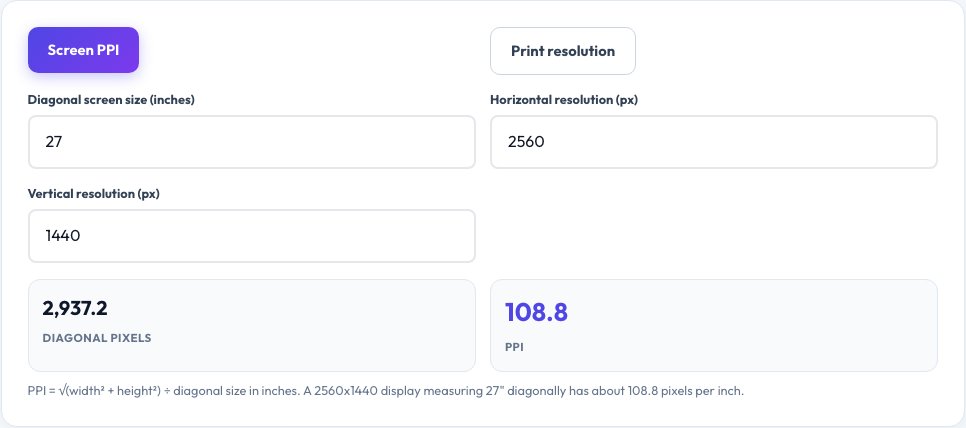
Choose screen PPI or print resolution mode.
 Download it
For screens: enter diagonal size and resolution.
PPI / DPI Calculator — Screen Density and Print Resolution
Enter a screen's diagonal size and its horizontal and vertical resolution, and this tool calculates its real pixel density (PPI, pixels per inch) using the actual Pythagorean geometry involved: the diagonal resolution in pixels is found from the horizontal and vertical pixel counts, then divided by the physical diagonal size in inches — the same real math manufacturers use to publish a display's PPI spec.
Switch to print mode for the reverse, more common everyday question: given a physical print size (like 4x6 inches) and a target print quality in DPI (dots per inch — 300 DPI is the standard for sharp photo prints), this tool calculates the exact pixel dimensions your image file needs to be, so you know before you order a print or design a template whether your photo has enough resolution.
Key features
Real diagonal pixel geometry
Uses the actual Pythagorean calculation from horizontal/vertical resolution, not an approximation.
Screen PPI mode
Find a display's true pixel density from its size and resolution.
Print resolution mode
Calculate the exact pixel dimensions needed for a target print size and DPI.
Instant, precise results
Real math, not a rounded lookup table.
How to use it
- Choose screen PPI or print resolution mode.
- For screens: enter diagonal size and resolution.
- For print: enter print size and target DPI.
- Read the calculated PPI or required pixel dimensions.
Worked example
Example
A 27-inch monitor at 2560x1440 -> about 108.8 PPI. Printing a photo at 6x4 inches at 300 DPI -> needs an image at least 1800x1200 pixels.
Who uses this tool
Anyone comparing monitor or phone screen sharpness
Get the real PPI number instead of relying on marketing claims.
Photographers and print buyers
Confirm an image has enough resolution before ordering a physical print.
Designers setting up a print template
Work out the exact pixel canvas size needed for a target print size and DPI.
Tips for the best results
- Higher PPI means a sharper display at a given viewing distance, but viewing distance matters too — a lower-PPI TV viewed from across a room can look as sharp as a higher-PPI phone held close.
- For photo prints, 300 DPI is the standard for sharp results; 150 DPI is acceptable for large posters viewed from a distance, and below 150 DPI often looks visibly soft up close.
- PPI (pixels per inch, a display property) and DPI (dots per inch, historically a print/scanning term) are often used interchangeably in casual conversation even though they technically describe different physical processes.
Common mistakes to avoid
- Ordering a large print from a low-resolution image and being surprised by soft, blurry results — check the pixel dimensions against the target DPI first.
- Assuming a higher PPI screen spec always looks sharper in practice without accounting for typical viewing distance.
- Confusing a display's native resolution with its PPI — PPI depends on both resolution and physical screen size, not resolution alone.
Why use AZRS QuickFix?
It is 100% free, needs no signup and has no watermark or usage limits. The tool runs in your browser, so what you type stays on your device, and it works on phones, tablets and desktops. New tools are added every week — bookmark this page or browse the full QuickFix toolbox.
Frequently asked questions
What is PPI?
Pixels per inch — a measure of how densely packed a screen's (or image's) pixels are, calculated from the diagonal pixel count divided by the physical diagonal size in inches.
What DPI do I need for printing photos?
300 DPI is the standard for sharp, professional-quality photo prints; 150 DPI is acceptable for large posters viewed from further away.
Is PPI the same as DPI?
Technically PPI describes pixel density on a screen or in a digital image, while DPI describes dots of ink from a printer or a scanner's sampling rate — in casual use the two terms are very often used interchangeably.
How is PPI calculated?
The diagonal pixel count is found using the Pythagorean theorem from the horizontal and vertical resolution, then divided by the display's physical diagonal size in inches.
What resolution do I need for a 4x6 inch print at 300 DPI?
1200 x 1800 pixels — multiply each physical dimension in inches by the target DPI.
Is this free?
Yes, unlimited calculations, no signup.