Amazon FBA Profit Calculator
Real per-item profit and margin for Amazon FBA, with the fulfillment fee auto-calculated from your weight and dimensions · free, no signup
Amazon FBA Profit Calculator
Enter your product's sell price, your cost to make or source it, your inbound shipping cost per unit, Amazon's referral fee percentage for your product category (about 15% for most categories, selectable), and — instead of typing in a fulfillment fee you'd have to already know — your product's real weight and package dimensions. This tool auto-classifies your product into Amazon's actual size tier (small standard, large standard, small/medium/large/special oversize) using the real weight, longest-side, second-side, height and length+girth thresholds, then looks up the matching fulfillment fee from an embedded copy of Amazon's published fee schedule, so the math matches your real product without a trip to Seller Central.
Amazon's real fee structure has two main pieces: the referral fee (a percentage of the sale price that varies by category, roughly 8-17% with most categories at 15%) and FBA fulfillment fees (a per-unit fee based on the size/weight tier your product actually falls into, covering picking, packing and shipping). This tool auto-computes both from your real numbers — no guessing, no manual fee lookup.
Key features
Auto-calculated fulfillment fee
Enter weight and dimensions; the tool classifies your real size tier and looks up the fee — you never have to already know it.
Real size-tier classification
Uses Amazon's actual small/large standard and small/medium/large/special oversize thresholds (weight, sides, length+girth).
Real referral fee by category
Choose from Amazon's actual referral fee tiers instead of guessing a flat 15%.
Real profit per item
Sell price minus product cost, shipping, referral fee and the auto-calculated fulfillment fee — no hidden math.
How to use it
- Enter your sell price, product cost and inbound shipping cost per unit.
- Choose the referral fee category (defaults to 15%, the most common rate).
- Enter your product's weight (lb + oz) and package length, width and height.
- See your auto-classified size tier, auto-calculated fulfillment fee, real profit and margin instantly.
Worked example
Example
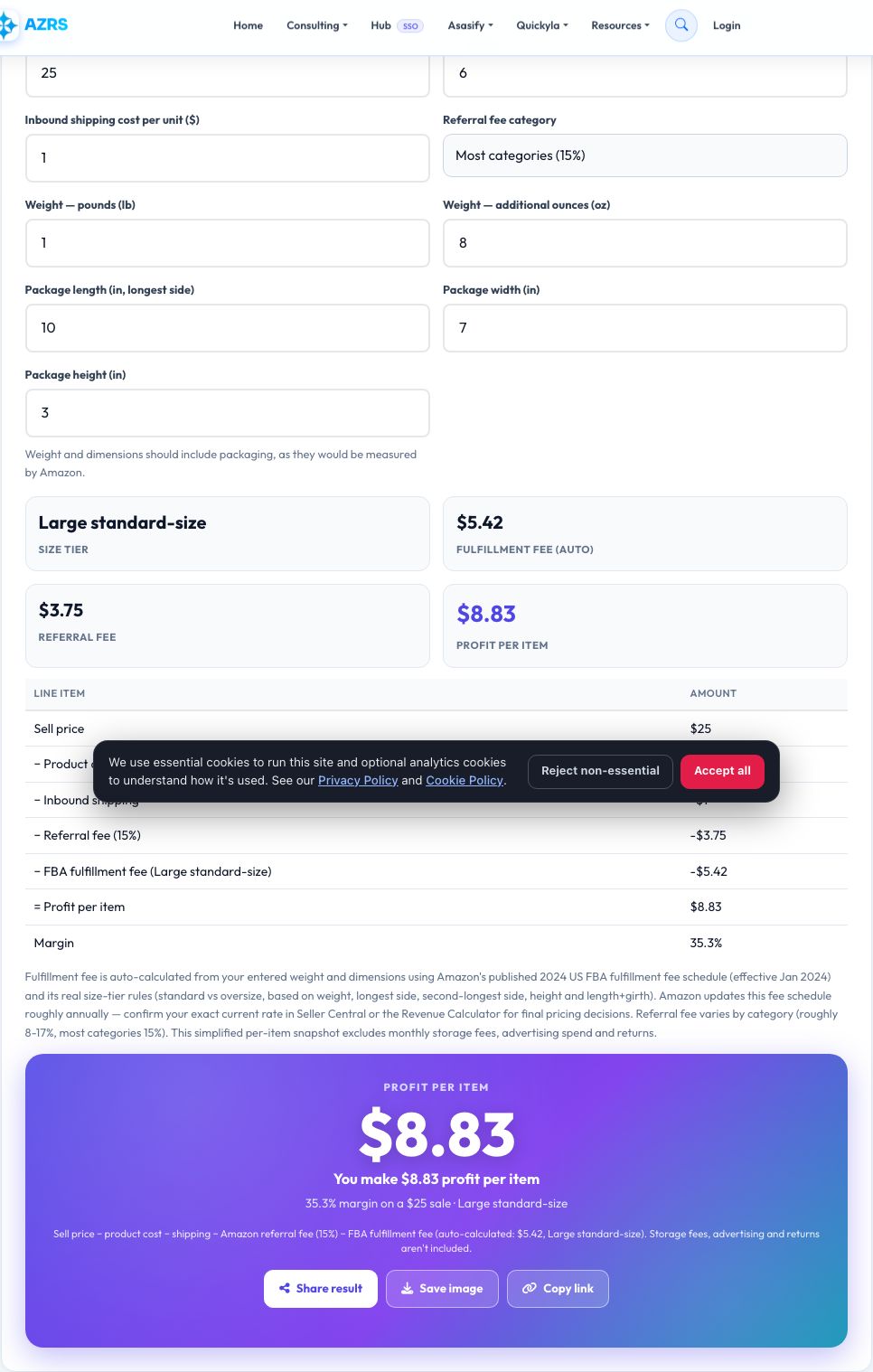
Sell price $25, product cost $6, shipping $1, referral fee 15% ($3.75), 1lb 8oz item at 10×7×3in → classified as Large standard-size, fulfillment fee auto-calculated at $5.42 → profit $8.83 per item, a 35% margin.
Who uses this tool
New and existing Amazon sellers
Vet a product idea's real profitability before committing inventory budget, without needing to already know Amazon's fee for a product you haven't listed yet.
Sourcing and product research
Compare multiple product weights/dimensions against the same sell price to find the best margin.
Anyone quoted FBA fees by a supplier or tool
Cross-check that the numbers actually leave a real profit using an independently calculated fee.
Tips for the best results
- Weigh and measure the actual packaged product, the way Amazon would measure it, for the most accurate tier classification.
- If your item is close to a tier boundary (like just over 16oz or just over 0.75in tall), a small packaging change can drop it to a cheaper tier — worth testing.
- Always cross-check the auto-calculated fee against Amazon's own Revenue Calculator or Seller Central before finalizing pricing, since Amazon updates this fee schedule roughly annually.
Common mistakes to avoid
- Forgetting inbound shipping cost to Amazon's warehouse, which lowers real profit.
- Measuring the product without its packaging, which can put it in the wrong size tier.
- Ignoring advertising spend, returns and storage fees, which this simple per-item calculator does not include.
Why use AZRS QuickFix?
It is 100% free, needs no signup and has no watermark or usage limits. The tool runs in your browser, so what you type stays on your device, and it works on phones, tablets and desktops. New tools are added every week — bookmark this page or browse the full QuickFix toolbox.
Frequently asked questions
How is the fulfillment fee calculated now?
Automatically — enter your product's weight and package dimensions and the tool classifies the real Amazon size tier (standard vs oversize, and which sub-tier) then looks up the matching fee from an embedded copy of Amazon's published fee schedule. You no longer need to already know or manually type in the fee.
Which fee schedule is this based on?
Amazon's published 2024 US FBA fulfillment fee schedule (effective Jan 2024), the most recent full schedule built into this tool. Amazon updates fulfillment fees roughly annually (and sometimes mid-year), so confirm your exact current rate in Seller Central or the Revenue Calculator for final pricing — this is disclosed directly in the result.
What is Amazon's referral fee?
A percentage Amazon takes from every sale, varying by category — most categories are 15%, though some (like electronics accessories or media) are lower and a few are higher; check Seller Central for your exact category rate.
Does this include storage fees or advertising?
No, this is a simplified per-item profit snapshot covering sell price, product cost, shipping, referral fee and the auto-calculated fulfillment fee only; monthly storage fees and ad spend should be subtracted separately for a full picture.
How accurate is the auto-calculated fee?
It follows Amazon's real, published tiering rules and fee bands closely, but Amazon periodically revises exact dollar amounts, especially for oversize tiers — the tool flags large/special-oversize results as the ones most worth double-checking.
Is my data stored?
No, everything is calculated locally in your browser.