Filament Chooser — PLA vs PETG vs ABS vs ASA vs TPU vs Nylon
Tell it what the part needs and see the best-matching 3D printing materials with settings and trade-offs · free, no signup
What does the part need?
See Filament Chooser — PLA vs PETG vs ABS vs ASA vs TPU vs Nylon in action
Free Filament Chooser — Find the Right 3D Printing Material
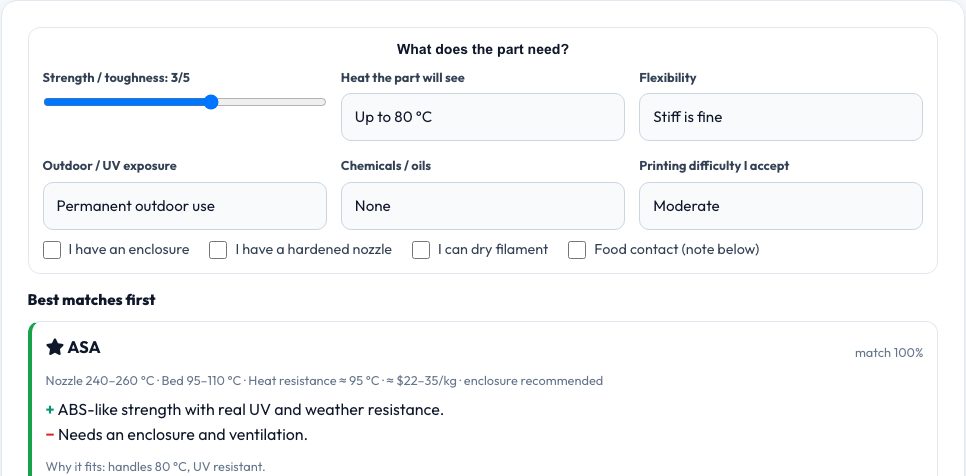
PLA is easy, PETG is tough, ABS and ASA handle heat, TPU bends, nylon wears — but which one does your part need? Set how strong it must be, how hot it will get, whether it must flex, how much UV and chemical exposure it sees, what difficulty you accept and what hardware you have (enclosure, hardened nozzle, dry box) and the chooser ranks twelve materials with a match score and the reasons.
Each result lists nozzle and bed temperatures, heat deflection, approximate price, pros and cons and a food-contact note. Values are typical manufacturer figures and vary by brand, so always check the spool's data sheet.
Key features
12 materials
PLA, PLA+, PETG, ABS, ASA, TPU, nylon, PC, CF blends, HIPS, PCTG.
Match scoring
Strength, heat, flex, UV, chemicals, difficulty.
Hardware aware
Penalises materials that need gear you lack.
Print settings
Typical nozzle and bed temperatures.
How to use it
- Set strength, heat, flexibility and exposure.
- Say what hardware you have.
- Read the ranked list.
- Check the datasheet of the chosen spool.
Worked example
Example
For a car-interior part that must survive 80 °C with UV, the chooser puts ASA first (HDT around 95 °C, good UV resistance) and warns that it needs an enclosure; PLA is ruled out below 55 °C.
Who uses this tool
Beginners
Pick a first material.
Engineers
Select a functional material.
Sellers
Choose the right material for products.
Makers
Outdoor and heat projects.
Tips for the best results
- Heat resistance is not continuous service temperature.
- Dry hygroscopic filaments before printing.
- Use hardened nozzles for carbon fibre.
- Test a small part first.
Common mistakes to avoid
- Using PLA in a hot car.
- Printing nylon without drying it.
- Assuming printed parts are food safe.
Why use AZRS QuickFix?
It is 100% free, needs no signup and has no watermark or usage limits. The tool runs in your browser, so what you type stays on your device, and it works on phones, tablets and desktops. New tools are added every week — bookmark this page or browse the full QuickFix toolbox.
Frequently asked questions
Are the values exact?
They are typical ranges.
Which is strongest?
Nylon CF and PC blends are strongest on desktop printers.
Is PETG food safe?
Natural PETG is best of the common ones but layer gaps make printed parts hard to clean.
Does price matter?
Approximate prices per kilogram are shown.