Projects
No projects yet.
Create one to start!
📁
Select or Create a Project
Projects keep your chats, files, and AI instructions organized in one workspace.
Preview

See AI Project Maker — Generate Full Projects with Code in action

azrscorp.com/ai/project-maker/
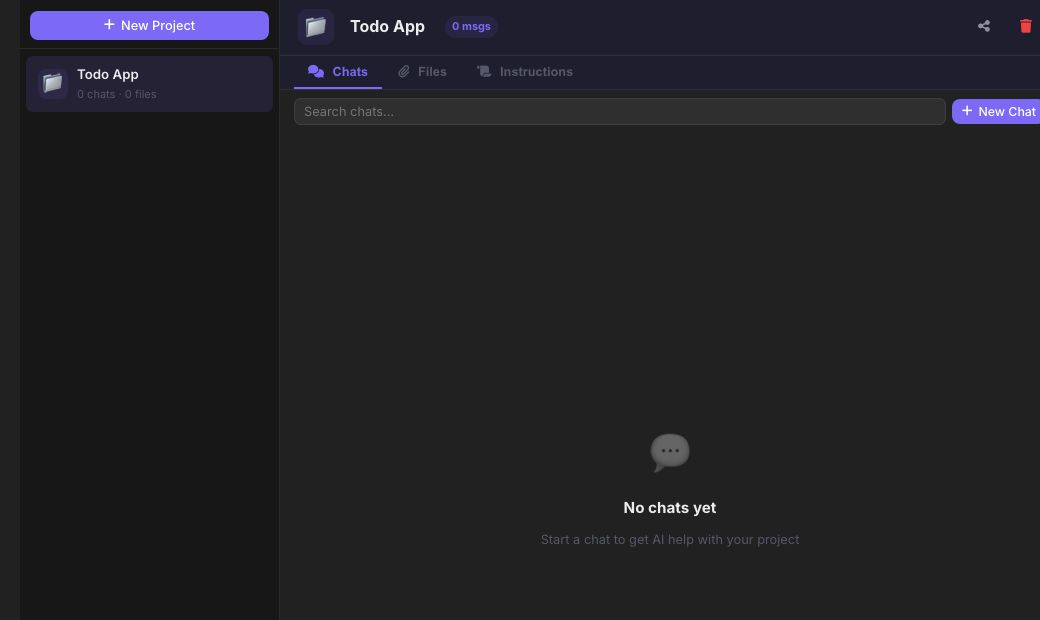
Screenshot of the free AI Project Maker — Generate Full Projects with Code tool on AZRS QuickFix
1Click New Project and give it a name (e.g. 'Todo App').
2Open New Chat inside that project — this is where you describe what to build.
3Describe the app or script you want, in plain English, and send it.
Overview

AI Project Maker — Generate Full Projects with Code

Project Maker turns a plain-English app idea into a real, working starter project: describe what you want to build and the AI generates the actual files and code needed to get started, not just a description of what you'd need to do.

It's built for the 'I know what I want but not where to start' moment — a landing page, a small script, a simple web app — and gives you working code you can copy out, run, and keep building on.

Highlights

Key features

Idea to code

Describe a project in a sentence or two and get generated code files back.

Multiple projects

Keep several project ideas going side by side in the left-hand project list.

Project chat

Ask follow-up questions or request changes within the same project's context.

Free, no login wall for a first try

Start generating immediately; sign up only if you want projects saved long-term.

Walkthrough

How to use it

  1. Click New Project and give it a name (e.g. 'Todo App').
  2. Open New Chat inside that project — this is where you describe what to build.
  3. Describe the app or script you want, in plain English, and send it.
  4. Read the generated code in the chat, copy it out, and ask follow-up questions to refine it further.
In practice

Worked example

Example

Inside a new project, send 'Generate a simple HTML+CSS+JS to-do list app with add, complete and delete' in the project chat and get back a complete, working single-file app with a features list and usage instructions — ready to save and open in a browser.
Audience

Who uses this tool

Beginners

See a complete working example instead of staring at a blank file.

Developers prototyping fast

Skip the boilerplate and get straight to a working skeleton.

Non-technical founders

Turn an app idea into real, inspectable code to hand to a developer or explore themselves.

Pro tips

Tips for the best results

  • Be specific about the tech stack if you have a preference (e.g. 'React' or 'plain HTML/CSS/JS') — otherwise the AI picks a sensible default.
  • Ask for one core feature first, then use project chat to add more — smaller asks generate more reliable code than one giant spec.
  • Always read and test generated code before using it in anything real — treat it as a strong first draft, not a finished, audited product.
  • Use Code Assistant afterward if you want a generated file explained line by line.
Watch out

Common mistakes to avoid

  • Asking for something enormous ('a full e-commerce platform with payments and admin') in one go — break big ideas into stages instead.
  • Not specifying the language/framework and then being surprised by the AI's default choice.
  • Deploying generated code straight to production without reviewing it for security or correctness.
Why AZRS

Why use AZRS QuickFix?

It is 100% free, needs no signup and has no watermark or usage limits. The tool runs in your browser, so what you type stays on your device, and it works on phones, tablets and desktops. New tools are added every week — bookmark this page or browse the full QuickFix toolbox.

FAQ

Frequently asked questions

Does it generate a complete, production-ready app?

It generates a real, working starting point — good for prototypes, learning and demos. Treat it as a strong first draft and review/test before production use.

What languages/frameworks can it use?

Whatever you ask for — plain HTML/CSS/JS, Python, React, and most mainstream languages/frameworks the underlying AI models know well.

Can I keep editing a project?

Yes, use project chat to ask for changes or additions within the same project.

Is it free?

Yes, generating projects is free with no limit.

Do I need an account?

No for a first try; sign up if you want your projects saved across sessions and devices.

Can it explain the code it generates?

Yes, ask follow-up questions in project chat, or paste the code into Code Assistant for a line-by-line explanation.

⚙️ Settings
General
Response language
AI replies in this language
Enter to send
Shift+Enter for new line
Auto web search
Search web for recent questions
Show timestamps
Time on each message
Auto-scroll to bottom
While AI is responding
Show source links
Display web search sources
AI & Models
PreciseCreative
This is added before every conversation to customize AI behavior.
Chat
Auto-generate chat titles
AI names chats by topic
Save chats locally
Keep history on this device
Show thinking dots
Animation while AI responds
Code syntax highlighting
Colorize code blocks
Auto-open canvas for code
Open side panel on code reply
Show provider badge
Which AI answered
Message sound
Play sound on new message
Appearance
Theme
Accent color
Font size
Message width
Compact messages
Less padding between messages
Animated backgrounds
Subtle motion effects
Voice & Speech
Auto-send after voice
Send immediately after mic stops
AI reads responses aloud
Text-to-speech for AI answers
Keyboard Shortcuts
New chatCtrl+N
Focus inputCtrl+/
Toggle sidebarCtrl+B
Open settingsCtrl+,
Send messageEnter
New lineShift+Enter
Stop generationEscape
Toggle dark/lightCtrl+D
Privacy & Data
Save chat history
Store messages on this device
Share usage for improvement
Anonymous analytics only
Link preview in messages
Generate previews for URLs
Remember model choice
Persist selected model
Notifications
Desktop notifications
When AI finishes responding
Sound on response
Subtle chime
Error alerts
Show pop-up on errors
Advanced
Debug mode
Show AI provider in responses
Markdown rendering
Format bold, code, lists etc.
LaTeX math rendering
Render math equations
Link detection
Auto-link URLs in messages
Check API keys status
Account
👤
Sign in to AZRS AI
Save chats to your account, sync across devices, and access your history anywhere.
Log in Create account