Regex Pattern Library & Tester
A curated library of ready-made, real regex patterns for email, URL, phone, IPv4 and more — test any of them instantly · free, no signup
See Regex Pattern Library & Tester in action
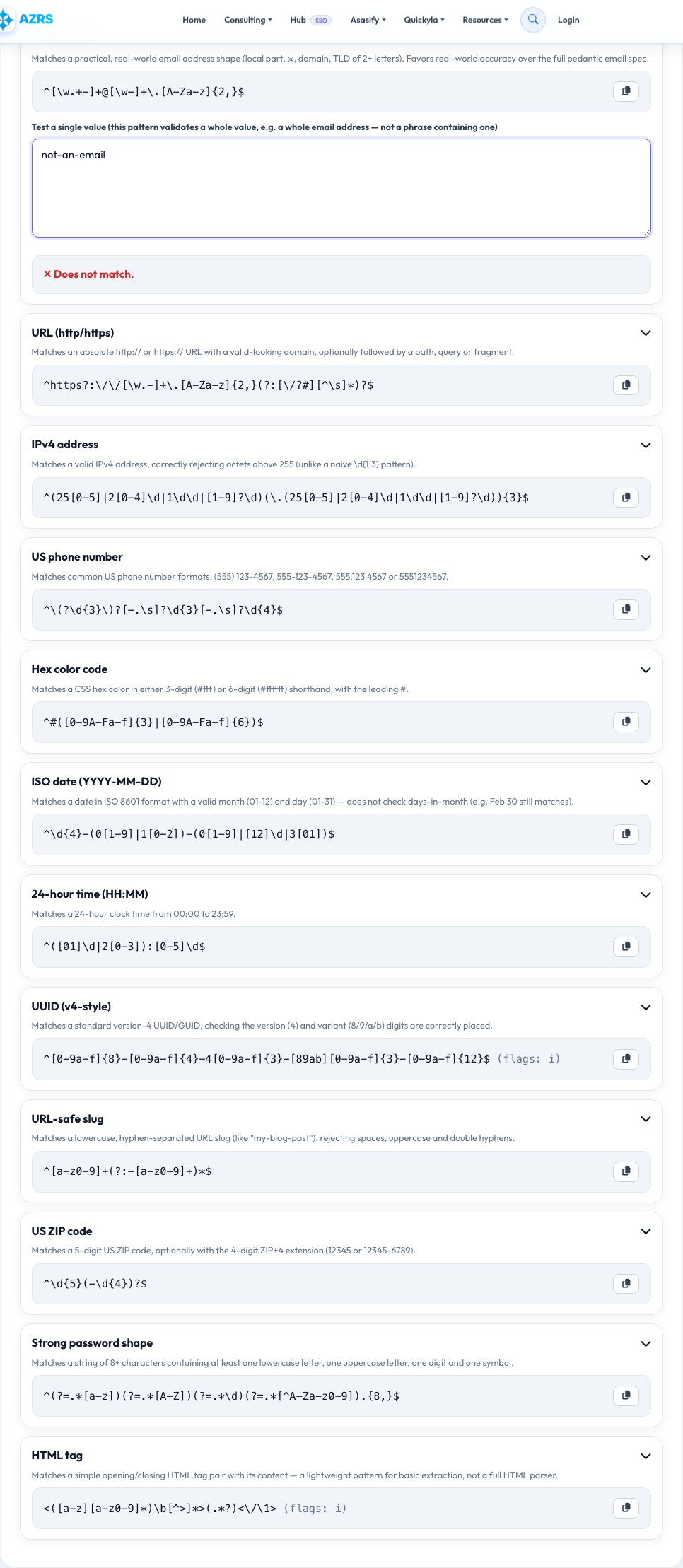
Regex Pattern Library — Ready-Made Patterns You Can Copy or Test
Writing a correct regular expression from scratch for something like email validation or a phone number is easy to get subtly wrong. This tool is a curated library of common, genuinely useful regex patterns — email address, URL, IPv4 address, US phone number, hex color code, ISO date, 24-hour time, UUID, URL-safe slug, US ZIP code and strong-password shape — each with a plain-English description of exactly what it matches and doesn't match, ready to copy straight into your code.
Click any pattern in the library and a live test box appears below it: for validation patterns like email or phone, paste a single real value and see an instant match/no-match verdict against the whole value; for the HTML-tag pattern, which searches within a larger string rather than validating a whole value, matches are highlighted inline — so either way you can confirm a pattern actually fits your real data before copying it, rather than trusting a name alone.
Key features
Curated, real-world patterns
Common needs like email, URL, phone and IPv4 — not an exhaustive, overwhelming list.
Plain-English description per pattern
Know exactly what each one matches and its real limitations.
Instant live testing
Test any library pattern against your own real value and get a clear match/no-match result.
One-click copy
Copy the exact pattern string, ready to paste into your code.
How to use it
- Browse the pattern library.
- Click a pattern to expand its description and test box.
- Paste your own sample text to test it live.
- Copy the pattern into your code.
Worked example
Example
Email pattern tested against "[email protected]" -> matches. Tested against "hello@example" (no top-level domain) -> no match, confirming the pattern correctly rejects an incomplete address.
Who uses this tool
Developers validating form input
Grab a correct, tested pattern instead of writing one from scratch under time pressure.
QA engineers
Quickly verify what a given pattern will and won't match against real sample data.
Students learning regex
See well-described real examples rather than only abstract syntax rules.
Tips for the best results
- No single "perfect" email regex exists that matches the full official email spec exactly — the pattern here favors practical accuracy for real-world addresses over pedantic edge cases, which is the right tradeoff for almost all form validation.
- Always test a library pattern against a few real examples from your own data before relying on it — the built-in tester makes this a five-second check.
- Patterns here use standard JavaScript regex syntax; minor escaping differences may apply if you're pasting into another language.
Common mistakes to avoid
- Trusting a regex pattern's name without testing it against your own real data first — always run the quick test before shipping it.
- Using an overly strict email or phone pattern that rejects valid real-world addresses/numbers with legitimate but less common formats.
- Copying a JavaScript-flavored pattern directly into a language with different regex escaping rules without checking compatibility.
Why use AZRS QuickFix?
It is 100% free, needs no signup and has no watermark or usage limits. The tool runs in your browser, so what you type stays on your device, and it works on phones, tablets and desktops. New tools are added every week — bookmark this page or browse the full QuickFix toolbox.
Frequently asked questions
Is there a single regex that perfectly validates every email address?
No — the official email spec is extremely permissive, so every practical regex (including this one) makes a reasonable tradeoff favoring real-world accuracy over matching every technically legal edge case.
Can I test my own text against these patterns?
Yes, click any pattern to open a live test box and paste your own sample text to see if and where it matches.
Are these patterns written for JavaScript specifically?
Yes, standard JavaScript regex syntax — most patterns translate directly to other languages, but double-check escaping rules for anything language-specific.
Is this the same as the site's regex tester tool?
No — the regex tester tool is for testing your own custom pattern; this is a curated library of ready-made common patterns you can browse, test and copy without writing one yourself.
Is my test text sent anywhere?
No, everything runs locally in your browser.
Is this free?
Yes, unlimited use, no signup.