Paper Size Reference & Comparison
Look up exact A-series, B-series, Letter and Legal paper dimensions in mm, inches and pixels at any DPI · free, no signup
How Paper Size Reference & Comparison works, step by step
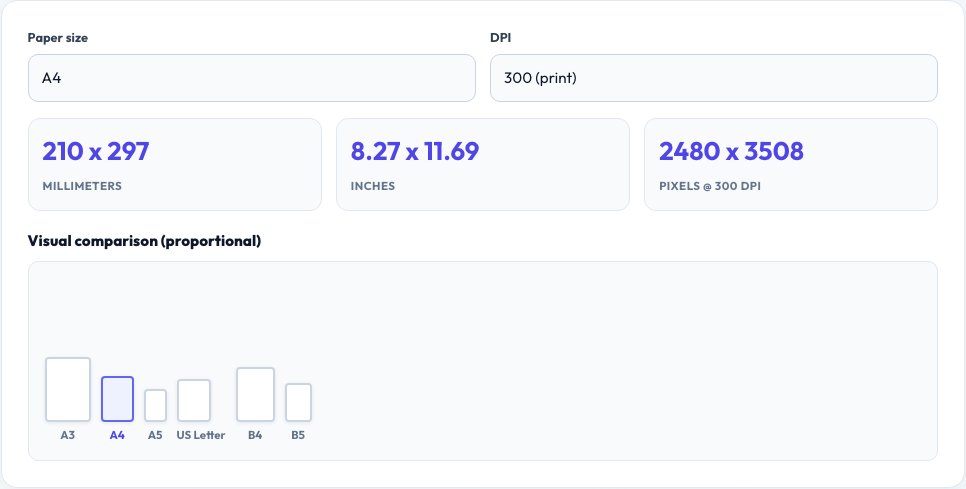
Choose a paper size (or view them all).
 Download it
Set your target DPI.
Paper Size Reference & Visual Comparison
Every standard paper size — the ISO A-series (A0 down to A10), the less common B-series, and the US Letter, Legal and Tabloid sizes — has an exact, fixed dimension in millimeters, and this tool lists them all. Pick a DPI (72 for screen, 96 for Windows-standard screen, 150 for draft print, 300 for high-quality print) and every size is also shown converted into inches and exact pixel dimensions at that resolution, which is exactly what you need when setting up a document, a print template or a design canvas.
A scaled visual comparison shows the sizes as proportional boxes side by side, so you can see at a glance how much bigger an A3 is than an A4 (exactly double, by design — that's the defining property of the A-series), or how US Letter compares to A4 (Letter is slightly shorter and wider).
Key features
Every standard size
Full A0-A10, B0-B10, Letter, Legal and Tabloid dimensions.
mm, inches and pixels together
See all three units at once, no separate lookup needed.
Any DPI
72, 96, 150, 300 or a custom value for exact pixel dimensions.
Visual proportional comparison
See relative sizes as scaled boxes, not just numbers.
How to use it
- Choose a paper size (or view them all).
- Set your target DPI.
- Read the dimensions in mm, inches and pixels.
- Use the visual comparison to see relative sizes at a glance.
Worked example
Example
A4 = 210 x 297mm = 8.27 x 11.69in = 2480 x 3508px at 300 DPI — the standard size and resolution used for a print-ready flyer or document.
Who uses this tool
Designers setting up a print document
Get the exact pixel canvas size for a target paper size and print DPI.
Developers building a PDF or print feature
Look up precise dimensions instead of guessing or hunting through old notes.
Anyone comparing US and international paper
See exactly how Letter differs from A4 side by side.
Tips for the best results
- The A-series is defined so each size is exactly half the previous one (A4 is half of A3, folded), which is why they stack and scale so cleanly — B-series sizes sit between consecutive A sizes for cases needing an in-between size.
- US Letter (8.5 x 11in) and A4 (210 x 297mm) are close but not the same — Letter is a bit shorter and wider, which is why documents formatted for one can shift or clip slightly when printed on the other.
- For high-quality print output, use 300 DPI; 150 DPI is acceptable for drafts, and 72-96 DPI is only appropriate for screen display, not print.
Common mistakes to avoid
- Designing a print document at screen resolution (72-96 DPI) and getting blurry, pixelated output — always use at least 300 DPI for final print.
- Assuming Letter and A4 are interchangeable — content laid out for one can clip or leave odd margins on the other.
- Forgetting that pixel dimensions depend entirely on the DPI you choose — the same A4 page is a completely different pixel size at 72 DPI versus 300 DPI.
Why use AZRS QuickFix?
It is 100% free, needs no signup and has no watermark or usage limits. The tool runs in your browser, so what you type stays on your device, and it works on phones, tablets and desktops. New tools are added every week — bookmark this page or browse the full QuickFix toolbox.
Frequently asked questions
What size in pixels is A4 at 300 DPI?
2480 x 3508 pixels — the standard resolution for a high-quality printable A4 document.
What's the difference between A4 and US Letter?
A4 is 210 x 297mm; US Letter is 215.9 x 279.4mm (8.5 x 11in) — Letter is slightly wider and shorter than A4, a small but real difference that can affect margins when printing across regions.
Why does the A-series scale so neatly?
Each size is defined as exactly half the area of the previous one along the long edge, so A4 folded in half is A5, and two A4 sheets equal one A3 — a deliberate, elegant property of the ISO 216 standard.
What DPI should I use for print versus screen?
300 DPI for high-quality print, 150 DPI for acceptable draft print, and 72-96 DPI only for on-screen display — never for something you intend to print.
Is this free?
Yes, unlimited lookups, no signup.