Phone Storage Calculator — How Many Photos & Videos Fit
See how many photos or how many hours of video actually fit in your phone's storage · free, no signup
See Phone Storage Calculator — How Many Photos & Videos Fit in action
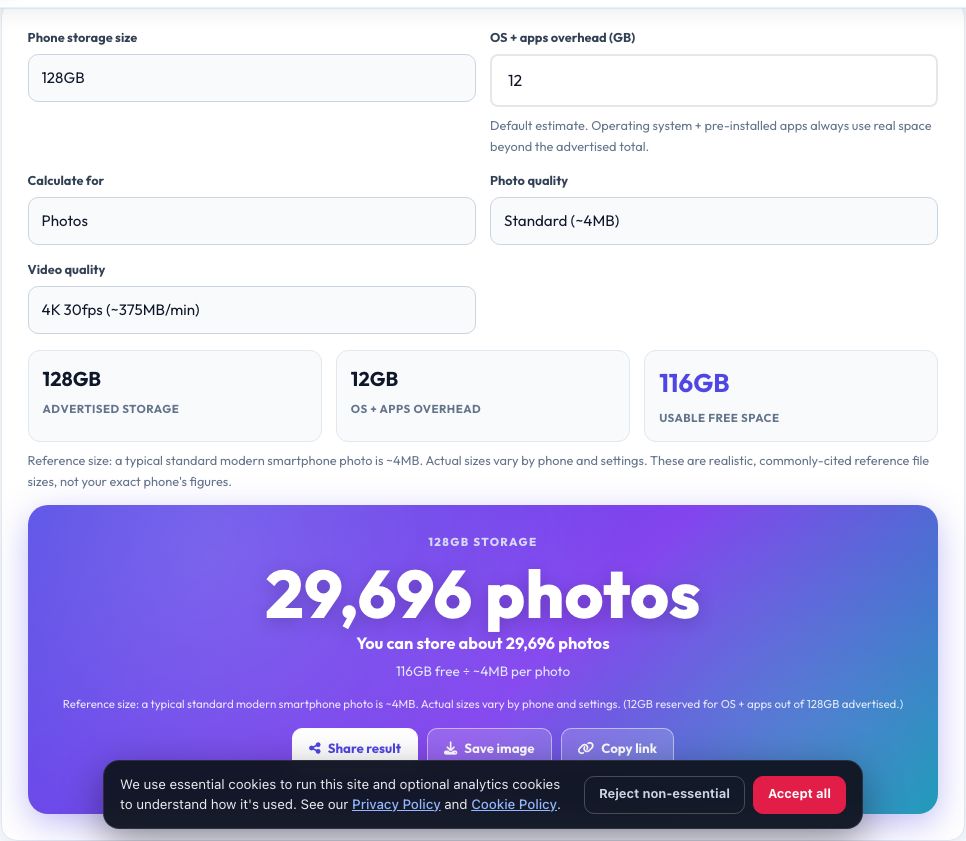
Phone Storage Calculator
Pick your phone's total storage (16GB up to 1TB) and roughly how much of it is already used by the operating system and apps (a realistic default is provided, since the OS and pre-installed apps always take a real bite out of the advertised number). Then choose your typical photo quality and video quality, and this tool divides your real remaining free space by realistic reference file sizes to estimate how many photos or how many hours of video actually fit.
Reference sizes are stated plainly since actual file sizes vary by phone model and settings: a typical modern smartphone photo is roughly 3-5MB (higher for RAW or 48MP+ modes), and 4K video runs roughly 350-400MB per minute (1080p is much smaller, at roughly 130-170MB per minute). These are reasonable, commonly-cited reference points, not your phone's exact figures.
Key features
Real storage math
Divides your actual free space by a stated reference file size — transparent, not a guess.
Accounts for OS + app overhead
Subtracts a realistic estimate for space the operating system and apps already use.
Photos or video
Switch between photo count and video hours based on your real usage.
Adjustable quality
Choose standard, high-res or RAW photos, and 1080p or 4K video, to match your real settings.
How to use it
- Choose your phone's total storage size.
- Adjust the OS/app overhead if you know it, or use the default.
- Choose your typical photo or video quality.
- See your real estimated photo count or video hours.
Worked example
Example
128GB phone, ~12GB OS/app overhead, standard 4-5MB photos → about 116GB free ÷ ~4.5MB per photo ≈ 26,000 photos, or about 4,900 minutes (~82 hours) of 4K video.
Who uses this tool
Anyone buying a new phone
Decide between storage tiers (128GB vs 256GB vs 512GB) based on a real usage estimate, not marketing language.
Photographers and videographers
Estimate how much a shoot day will realistically use of the storage available.
Parents buying a first phone for a kid
Get a realistic sense of whether a lower storage tier is genuinely enough.
Tips for the best results
- Cloud backup (like iCloud Photos or Google Photos) can free up on-device space by storing a lower-resolution copy locally — this calculator estimates full-resolution on-device storage.
- 4K video eats storage far faster than photos — a single vacation's worth of 4K clips can use more space than thousands of photos.
- RAW photo mode produces much larger files (often 20-40MB+) than standard JPEG/HEIC photos — switch the quality setting if you shoot RAW.
Common mistakes to avoid
- Assuming all of the advertised storage number is usable — the OS and pre-installed apps always take a real, non-trivial chunk out of it.
- Using photo file size assumptions for 4K video, which is dramatically larger per item.
- Forgetting that live photos, burst mode and portrait mode all produce noticeably larger files than a single standard photo.
Why use AZRS QuickFix?
It is 100% free, needs no signup and has no watermark or usage limits. The tool runs in your browser, so what you type stays on your device, and it works on phones, tablets and desktops. New tools are added every week — bookmark this page or browse the full QuickFix toolbox.
Frequently asked questions
Why don't I have the full advertised storage?
The operating system, pre-installed apps and system files use a real, non-trivial amount of the advertised total — commonly several gigabytes on modern phones — which this calculator subtracts before estimating photo/video capacity.
How big is a typical smartphone photo?
Roughly 3-5MB for a standard photo on a modern phone; RAW or very high-megapixel modes (48MP+) can be significantly larger, often 20MB or more.
How much storage does 4K video use?
Roughly 350-400MB per minute is a commonly cited reference for standard 4K/30fps recording; higher frame rates (60fps) or higher bitrates use more, and 1080p uses substantially less.
Does this account for cloud storage?
No, this estimates on-device, full-resolution storage; using a cloud photo service with 'optimize storage' turned on will let a phone hold far more than this calculator's estimate by storing smaller local copies.
Are these exact numbers?
No, they're realistic, commonly-cited reference file sizes — your actual results depend on your specific phone, camera settings and content.
Is my data stored?
No, everything is calculated locally in your browser.