Online Ruler (cm & inches, actual size)
A real-size on-screen ruler you calibrate with a credit card · free, no signup
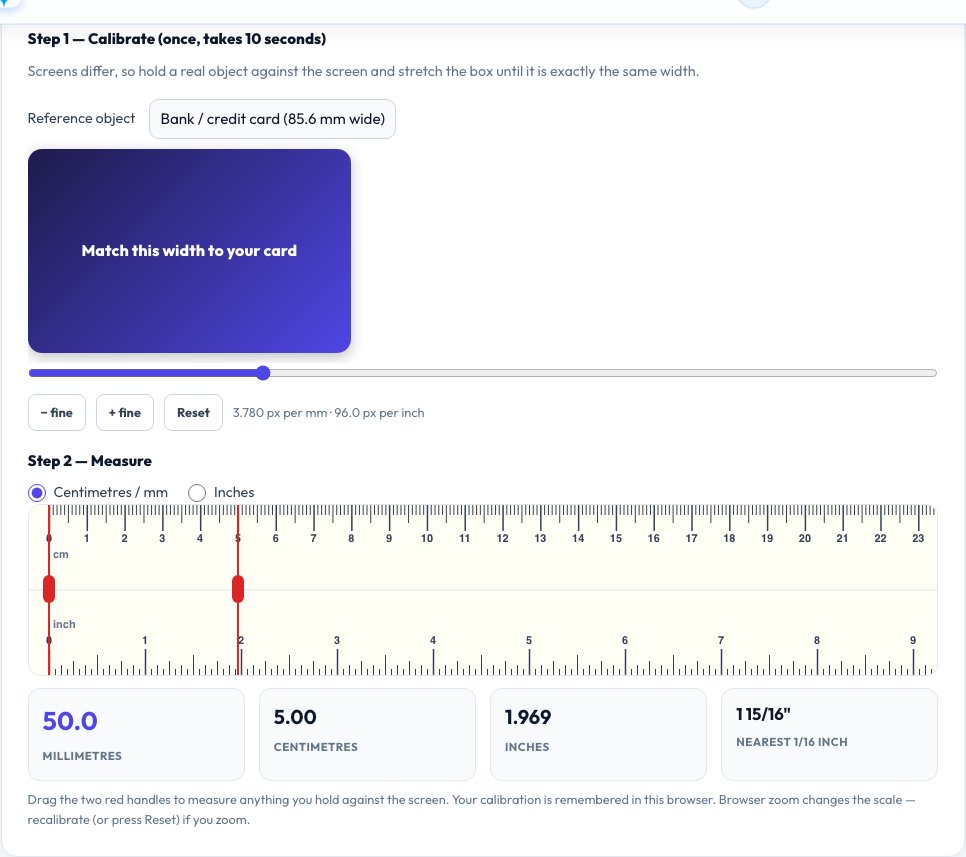
Screens differ, so hold a real object against the screen and stretch the box until it is exactly the same width.
See Online Ruler (cm & inches, actual size) in action
Free Online Ruler — Actual-Size Centimetres and Inches on Your Screen
Most online rulers are wrong because a web page cannot know how big a pixel is on your particular screen. This ruler fixes that with a ten-second calibration: hold a bank card (85.6 mm wide), a dollar bill or an A4 sheet against the screen and stretch the on-screen shape until it matches. From then on the ruler is drawn to your real screen scale, in millimetres, centimetres and inches (down to 1/16 inch).
Two red handles let you measure the length of any small object you hold up to the screen: drag them to its ends and read the distance in millimetres, centimetres, decimal inches and fractions. Your calibration is saved in your browser, so you only do it once per screen.
Key features
Real calibration
Match a bank card, banknote or A4 paper for true actual size.
cm, mm and inches
Millimetre ticks on top and 1/16 inch ticks on the bottom.
Two-point measuring
Drag handles to measure a length and read four units.
Remembered
Calibration is saved in your browser.
How to use it
- Choose a reference object and hold it against the screen.
- Move the slider until the shape is exactly as wide as the object.
- Hold the item you want to measure against the ruler.
- Drag the red handles to its edges and read the value.
Worked example
Example
A standard bank card is 85.6 mm wide. After calibration, dragging the handles across the card should read 85.6 mm (3.370 in, about 3 3/8 in).
Who uses this tool
Shoppers and crafters
Check sizes of jewellery, screws, photos and small parts.
Students and teachers
Measure and learn metric and imperial units.
Anyone without a ruler
A quick measurement for objects up to about 30 cm.
Tips for the best results
- Calibrate with the object you will trust most; a bank card is the same size worldwide.
- Do not change the browser zoom afterwards — press Reset and recalibrate if you do.
- Hold objects flat against the glass, not tilted.
- Look straight at the screen to avoid parallax error.
Common mistakes to avoid
- Using an uncalibrated ruler and trusting it.
- Changing browser zoom or display scaling after calibrating.
- Measuring a curved or angled edge without looking straight on.
Why use AZRS QuickFix?
It is 100% free, needs no signup and has no watermark or usage limits. The tool runs in your browser, so what you type stays on your device, and it works on phones, tablets and desktops. New tools are added every week — bookmark this page or browse the full QuickFix toolbox.
Frequently asked questions
How accurate is the online ruler?
After calibrating with a bank card, it is typically within about half a millimetre for small objects — good for quick checks, not for precision work.
Why do I need to calibrate?
Screens differ in pixel density, and a website cannot read that value, so a physical reference is the only reliable way to set the real scale.
How big is a credit card?
ISO 7810 ID-1 cards, including credit and debit cards, are 85.60 × 53.98 mm.
Does it work on a phone?
Yes, but the ruler is longer than the screen, so scroll it sideways; recalibrate in each orientation.
Is my calibration saved?
Yes, in your browser only.
Why are inches shown as fractions?
Imperial rulers are marked in 1/16 inch, so the result is rounded to the nearest 1/16 as well as shown as a decimal.