Word Counter & Text Analyzer
Count words, characters, sentences & paragraphs instantly. Advanced keyword density, reading time, and speaking time analytics — free, no signup required.
Word Counter & Text Analyzer
Analyze any text instantlyEnter text above or upload a file to see detailed analytics
Platform Word Limits
| Platform | Limit |
|---|---|
| Twitter / X | 280 chars |
| Instagram Caption | 2,200 chars |
| Facebook Post | 63,206 chars |
| LinkedIn Post | 3,000 chars |
| Google Meta Desc | 160 chars |
| Google Title Tag | 60 chars |
| YouTube Title | 100 chars |
| YouTube Description | 5,000 chars |
| Reddit Post Title | 300 chars |
| SMS Message | 160 chars |
Avg Word Length Guide
3–4 chars
4–5 chars
5–6 chars
6+ chars
Content Length Standards
Related Tools
See Free Word Counter & Text Analyzer in action
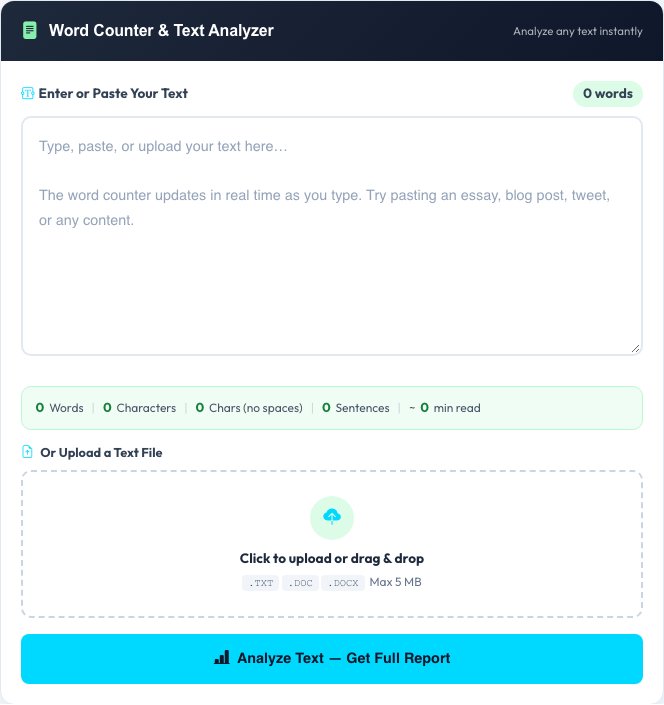
Free Word Counter & Text Analyzer
This word counter goes beyond a simple word tally. Type or paste any text — or upload a .txt, .doc or .docx file — and it instantly returns word count, character count (with and without spaces), sentence count, paragraph count, average word length and the number of unique words used.
It also estimates reading time and speaking time based on standard adult rates, and surfaces the top 10 most-used keywords with their occurrence count and density percentage, which is handy for checking whether an article leans too hard on one phrase before you publish it.
Key features
Live, detailed stats
Words, characters (with/without spaces), sentences, paragraphs and average word length in one pass.
Reading & speaking time
Estimates based on 200 wpm reading and 130 wpm speaking, useful for articles, scripts and speeches.
Keyword density
Top 10 non-stopword keywords with occurrence count and percentage — a quick SEO sanity check.
File upload
Analyze a .txt, .doc or .docx file directly instead of pasting the content by hand.
How to use it
- Paste or type your text into the box, or upload a .txt/.doc/.docx file.
- Submit to see word, character, sentence and paragraph counts instantly.
- Scroll to the keyword density table to see your most-repeated words.
- Check reading/speaking time if you're writing for a speech or timed content.
Worked example
Example
Paste a 500-word blog draft. The tool reports ~500 words, ~2,800 characters, ~22 sentences, a 2.5-minute reading time, and flags that "marketing" appears 14 times (2.8% density) — a sign to vary the wording.
Who uses this tool
Writers & bloggers
Check article length against a target word count and catch overused words before publishing.
Students
Verify an essay or assignment meets a minimum or maximum word count requirement.
SEO professionals
Spot keyword stuffing or thin content using the density table and reading-time estimate.
Tips for the best results
- Watch the keyword density table for any word above roughly 3% — that's often a sign of unnatural repetition.
- Reading time assumes 200 words per minute; for technical or dense content, actual reading time will run longer.
- Use the unique-word count alongside total words to gauge vocabulary variety in longer pieces.
- For scripts or speeches, the speaking-time estimate (130 wpm) is more useful than the reading-time one.
Common mistakes to avoid
- Comparing word count across languages — character-based languages like Chinese or Japanese don't count the same way as space-delimited English.
- Ignoring paragraph count when a platform (like a meta description or tweet) actually limits characters, not words.
- Assuming keyword density above 100% signals an error — it's normal for very short texts where one word repeats often relative to the total.
Why use AZRS QuickFix?
It is 100% free, needs no signup and has no watermark or usage limits. The tool runs in your browser, so what you type stays on your device, and it works on phones, tablets and desktops. New tools are added every week — bookmark this page or browse the full QuickFix toolbox.
Frequently asked questions
Is this word counter free?
Yes, 100% free with unlimited use — no signup, no limits and no ads.
Can I count words in an uploaded file?
Yes, upload a .txt, .doc or .docx file and the tool extracts and analyzes the text automatically.
What is keyword density?
It's how often a specific word appears relative to the total word count, shown as a percentage — useful for spotting overused words before publishing.
How is reading time calculated?
Using an average adult reading speed of 200 words per minute, rounded to the nearest minute.
Is my text stored anywhere?
Only in your personal history if you're logged in, and it's private to your account — never shared or sold.
Does it work for non-English text?
Character counts work for any language; word counts are most accurate for space-delimited languages like English.