SEO Analyzer
Complete Website SEO Audit — All Pages, Instant Results
Why Use Our SEO Analyzer?
Get comprehensive insights to improve your search rankings
Meta Tag Analysis
Check title tags, meta descriptions, and ensure they're optimized for search engines and click-through rates.
Heading Structure
Analyze H1 tags to ensure proper content hierarchy and keyword optimization throughout your pages.
Performance Metrics
Measure page load times, response times, and identify performance bottlenecks affecting user experience.
Link Analysis
Discover broken links, analyze internal linking structure, and optimize your site navigation.
Mobile Optimization
Check viewport settings and ensure your site works perfectly on all devices.
Technical SEO
Audit HTTP status codes, page sizes, and other critical technical SEO elements.
How to Use This Tool Effectively
Actionable SEO advice to get the most out of every analysis
Start With Your Competitors
Run your top 3 competitors through this tool first. Understanding their structure, keywords, and technical issues reveals exactly where you can outrank them.
Run Monthly Audits
SEO is not a one-time task. Schedule monthly checks to catch new issues before Google penalizes them. Consistent analysis beats one big yearly audit every time.
Fix High-Impact Issues First
Not all errors are equal. Prioritize: broken crawl paths → missing meta titles → slow load times → thin content. This order maximizes ranking gains per hour spent.
Internal Links Are Free PageRank
Every internal link passes authority between your pages. Use the Internal Link Finder to ensure your most important pages receive the most internal links.
Page Speed Directly Affects Rankings
Google's Core Web Vitals are a confirmed ranking factor. Pages loading under 2.5 seconds see significantly higher rankings and 40% lower bounce rates than slow pages.
Keep Your Sitemap Clean
Your sitemap tells Google what to index. Remove redirect chains, 404s, and noindex pages from it. A clean sitemap = faster, more complete indexation of good content.
More Free SEO Tools
Everything you need to dominate search rankings — all free, no signup required
🔍 SEO & Website Analysis
🧮 Free Calculators
⚙️ Developer & Utility Tools
See Free SEO Analyzer — Full-Site Crawl & Audit in action
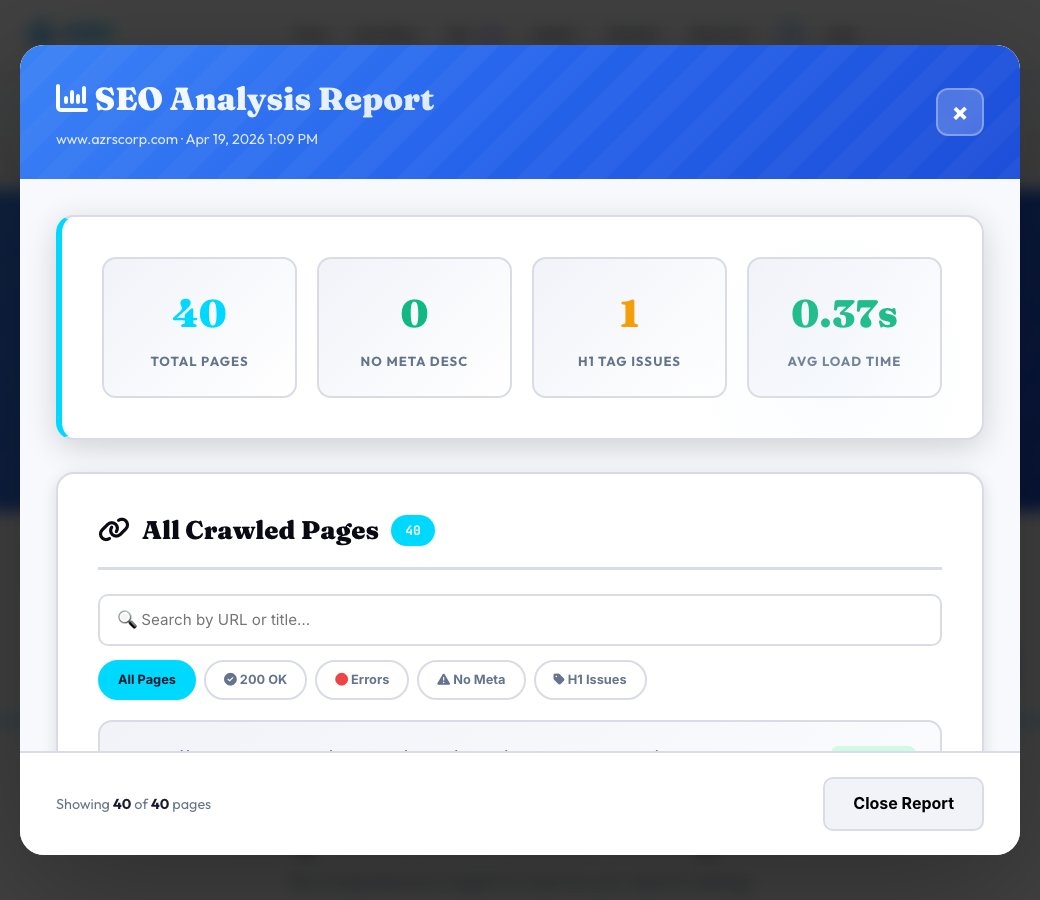
Free SEO Analyzer — Full-Site Crawl & Audit
Enter a starting URL and this tool crawls up to 40 pages of that site (following internal links, 8-second timeout per request) to build a real audit: page titles, meta descriptions, H1 counts, HTTP status codes and per-page load times, all stored so you can review them page by page instead of guessing from a single homepage scan.
Unlike single-page 'paste your HTML' checkers, this crawls the site the way a search engine actually discovers it — so pages missing a meta description, pages with zero or multiple H1 tags, and slow-loading pages surface automatically across the whole crawl, not just the one URL you typed.
Key features
Real multi-page crawl
Follows internal links up to 40 pages per run instead of auditing one URL in isolation.
Missing meta description count
Instantly see how many crawled pages have no meta description at all.
H1 structure check
Flags pages with more than one H1, a common on-page SEO and accessibility issue.
Per-page load time
Every crawled page's response time is logged so slow outliers are easy to spot.
How to use it
- Enter the site's starting URL (its homepage or any internal page).
- Submit the crawl and let it follow internal links (up to 40 pages).
- Review the page list: titles, meta descriptions, H1 counts and load times.
- Re-run after fixes to confirm the missing-meta and multi-H1 counts drop.
Worked example
Example
Crawling a 25-page site turns up 6 pages with no meta description and 2 pages with two H1 tags each — a clear, prioritized fix list instead of manually opening 25 tabs.
Who uses this tool
Site owners doing a first SEO pass
Get a real, page-by-page list of technical gaps instead of a vague 'improve your SEO' score.
Agencies onboarding a new client
Run a fast baseline crawl before proposing a scope of work.
Developers after a redesign
Confirm titles, meta descriptions and heading structure survived the migration.
Tips for the best results
- Start the crawl from the homepage so internal-link discovery covers the most pages.
- Re-crawl the same domain after fixes — the previous crawl's pages are cleared so you always see current state.
- Pay attention to the multi-H1 count first; it's one of the fastest technical wins to fix.
- A crawl capped at 40 pages is meant for a fast audit pass, not a full enterprise-site inventory — for very large sites, audit key sections separately.
Common mistakes to avoid
- Assuming a 0 result means a site has no SEO issues — this checks structural basics, not keyword strategy or backlinks.
- Crawling a staging or password-protected URL, which returns mostly non-200 statuses and skews the results.
- Ignoring the H1 count column — search engines and screen readers both care about a single, clear H1 per page.
Why use AZRS QuickFix?
It is 100% free, needs no signup and has no watermark or usage limits. The tool runs in your browser, so what you type stays on your device, and it works on phones, tablets and desktops. New tools are added every week — bookmark this page or browse the full QuickFix toolbox.
Frequently asked questions
How many pages does the crawl cover?
Up to 40 pages per run, discovered by following internal links from your starting URL, with an 8-second timeout per page request.
Does it check backlinks or keyword rankings?
No — this audits on-page technical SEO (titles, meta descriptions, H1 structure, status codes, load time) across the crawled pages, not off-site signals.
What happens to pages that return an error?
They're still logged with their HTTP status code so broken or blocked URLs are visible in the results, not silently skipped.
Can I re-run it on the same site?
Yes — re-submitting the same domain clears the previous crawl's stored pages and replaces them with fresh results.
Why isn't every page on my site included?
The crawl stops at 40 pages to keep the audit fast; for larger sites, run it against specific sections (like /blog/ or /products/) as a starting URL.
Is this free and unlimited?
Yes, free with no signup required.