Exact Time & Clock Accuracy Check
See the exact time and how many milliseconds your device clock is off · free, no signup
See Exact Time & Clock Accuracy Check in action
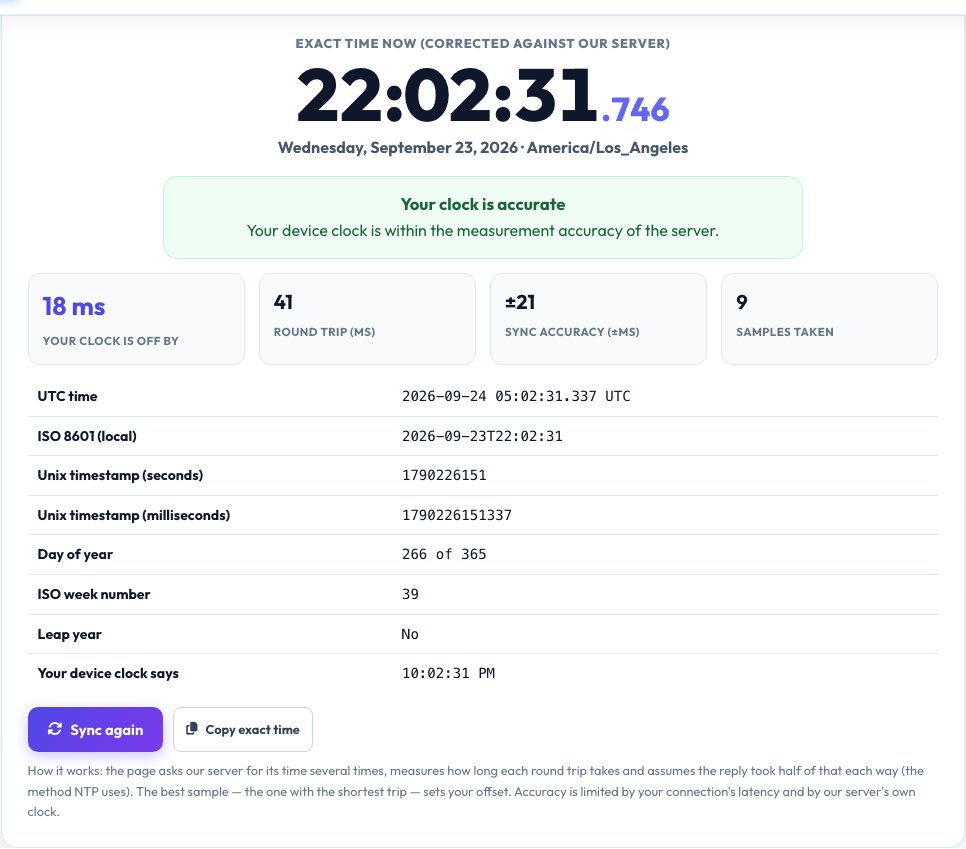
Exact Time Now — Is Your Computer or Phone Clock Correct?
Wrong clocks cause failed logins with two-factor codes, expired-certificate errors, broken meetings and confusing file dates. This tool shows the exact time to the millisecond and tells you how far your device clock is fast or slow.
It works like NTP: the page asks our server for its time nine times, measures how long each round trip takes, assumes the reply spent half of that in each direction and uses the fastest sample to calculate the offset. You get a live corrected clock, your clock's error and the accuracy of the measurement, plus UTC time, ISO 8601, Unix timestamps, day of year, ISO week number and leap-year status, all corrected to the true time.
Key features
Millisecond clock
A live clock corrected against the server.
Offset and accuracy
How fast or slow you are, with ± accuracy shown.
Time formats
UTC, ISO 8601, Unix seconds and milliseconds.
Auto re-sync
Repeats every two minutes to stay accurate.
How to use it
- Open the page — it syncs automatically.
- Read the verdict on your clock and the offset in milliseconds.
- Use the corrected clock or copy the exact time.
- Click Sync again after changing your system settings.
Worked example
Example
Your clock is 2.31 seconds fast → your 2FA codes may fail and meetings show odd times.
Within ±40 ms → accurate.
Who uses this tool
Anyone with 2FA problems
Codes fail when the phone clock is a minute off.
Developers and admins
Compare device time with a reference and get Unix time.
Event and sports timing
Start things at the exact second.
Tips for the best results
- Turn on “Set time automatically” and the correct time zone in system settings.
- Use a wired or stable connection for the best accuracy.
- Sync several times — the shortest round trip gives the best sample.
- Virtual machines drift more than phones; re-check them.
Common mistakes to avoid
- Confusing the wrong time zone with a wrong clock.
- Expecting millisecond precision over a slow mobile connection.
- Ignoring a clock that is minutes off, which breaks security certificates.
Why use AZRS QuickFix?
It is 100% free, needs no signup and has no watermark or usage limits. The tool runs in your browser, so what you type stays on your device, and it works on phones, tablets and desktops. New tools are added every week — bookmark this page or browse the full QuickFix toolbox.
Frequently asked questions
How do you know the true time?
We compare with our server's clock, which is kept in sync by network time protocol. Accuracy is roughly half your round-trip time plus the server's own tiny error.
How accurate is this?
Usually within tens of milliseconds on a good connection, shown as ± under Sync accuracy.
Why does 2FA fail with a wrong clock?
One-time codes are computed from the current time, so a clock more than about 30 seconds off produces invalid codes.
How do I fix a wrong clock?
Enable automatic time in your operating-system date and time settings and choose the right time zone.
What is a Unix timestamp?
The number of seconds (or milliseconds) since 1 January 1970 UTC.
Does it use my location?
No. Only your device clock is compared with our server.