Exercise Timer with Voice (Your Own Exercises)
Type your exercises, set work and rest, and a voice calls each one out · free, no signup
Voice coach
See Exercise Timer with Voice (Your Own Exercises) in action
Exercise Timer with Voice (Your Own Exercises)
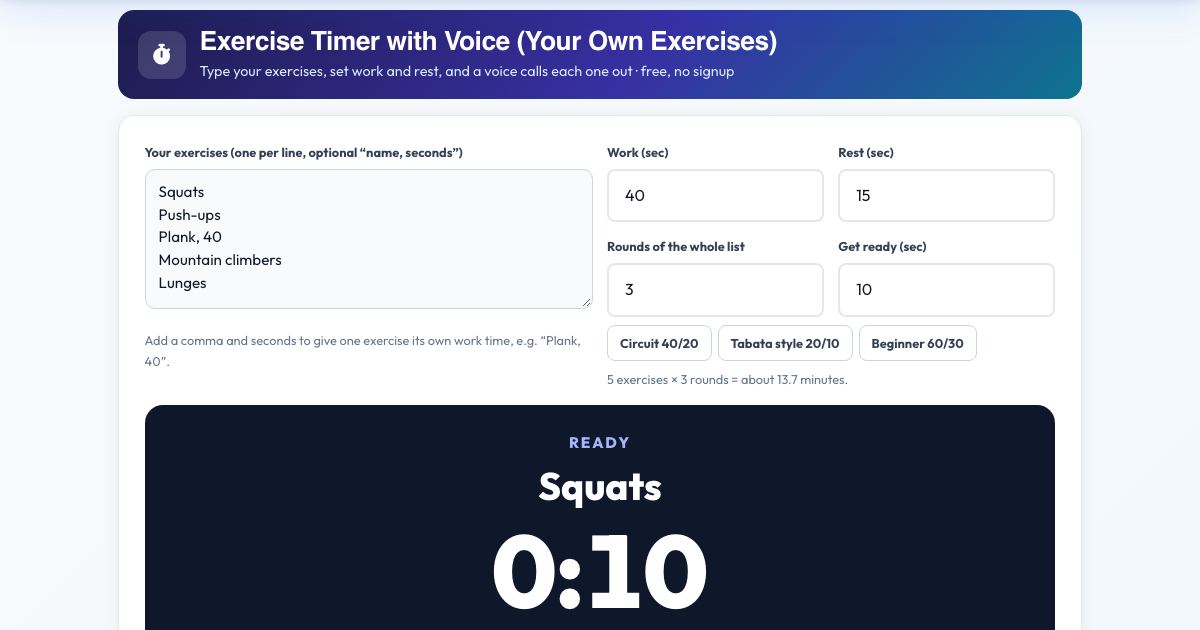
Type your own exercise list, choose work and rest times and the number of rounds, then press Start. The timer calls out every exercise by name ("Squats. Go!"), counts down the last three seconds, tells you what is next during rest, and says halfway and ten seconds on long holds.
Unlike a plain interval timer, every round has your named exercises, and any exercise can have its own time, such as "Plank, 40". Your list is saved on this device and the finished workout is added to your workout log.
Key features
Your own exercise list
One per line, any names.
Per-exercise time
Write Plank, 40 for a longer hold.
Voice calls every exercise
Kokoro coach voice, 27 voices.
Countdown, halfway and next-up
Hear what comes after rest.
Pause, skip and reset
Full control mid-workout.
Screen stays on
No dimming during a workout.
Saved on your device
Your list and settings are remembered.
How to use it
- Type your exercises, one per line, or tap a preset.
- Set work seconds, rest seconds and rounds.
- Press Start and follow the voice.
- Finish to log the workout.
Worked example
Example
Squats, Push-ups, Plank (40 s), 40 s work, 15 s rest, 3 rounds: about 7 minutes with the voice naming every move.
Who uses this tool
Home circuits
Any exercises, no equipment list needed.
Gym sessions
Rest and station timing.
Teachers and coaches
Run a class circuit.
Tips for the best results
- Keep exercises in the order you will really do them.
- Use 15 to 20 seconds rest for conditioning, 45 to 60 for strength.
Common mistakes to avoid
- Making the first round too long.
- Skipping the get-ready time.
Why use AZRS QuickFix?
It is 100% free, needs no signup and has no watermark or usage limits. The tool runs in your browser, so what you type stays on your device, and it works on phones, tablets and desktops. New tools are added every week — bookmark this page or browse the full QuickFix toolbox.
Frequently asked questions
How is it different from the Tabata timer?
The Tabata timer repeats one generic work and rest. This one runs your named list of exercises, announces each one and the next move, and lets one exercise have its own time.
Is it free and private?
Yes. It is free with no signup. Everything runs in your browser and anything saved stays on your own device.