Gridfinity Bin & Baseplate Generator
Generate custom Gridfinity bins and baseplates as STL — any size, dividers, scoop · free, no signup
See Gridfinity Bin & Baseplate Generator in action
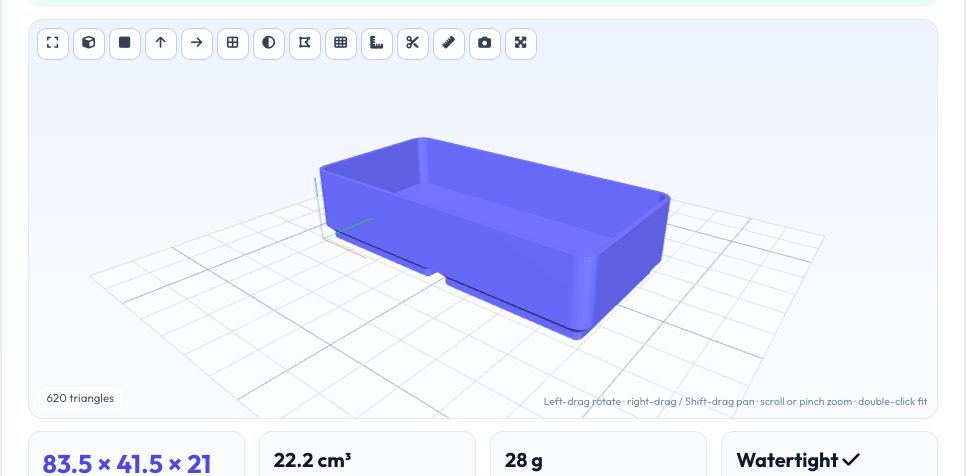
Free Gridfinity Bin & Baseplate Generator
Gridfinity is the open modular storage system that has taken over workshops: baseplates on a 42 mm grid hold bins that are 41.5 mm per unit, with a stepped foot (0.8 mm, 1.8 mm and 2.15 mm profile) and heights in 7 mm units. This generator builds both from your numbers. For a bin choose the units wide and deep (up to 6 × 6), the height in 7 mm units, the wall and floor thickness, the number of dividers and an optional scoop; for a baseplate choose the grid size, the pocket clearance and the solid bottom thickness.
The models are constructed with solid geometry — rounded-rectangle frustums for the feet, a hollowed body, internal walls — and exported as closed manifold meshes. Because exact fit depends on your printer, print a single 1×1 bin and baseplate first and adjust the clearance if bins are too tight or loose.
Key features
Bins of any size
1×1 to 6×6 units, any height in 7 mm units, wall/floor settings.
Dividers & scoop
Internal dividers along X and a front scoop.
Baseplates
Grid of stepped-foot pockets with clearance and optional solid bottom.
STL & 3MF
Closed meshes with a 3D preview.
How to use it
- Choose Bin or Baseplate.
- Enter the grid size and height/clearance.
- Preview and check weight.
- Download the STL, print a test cell and adjust.
Worked example
Example
A 2×1×3 bin is 83.5 × 41.5 × 21 mm with a 4.75 mm foot, 1.2 mm walls and a divider; a 3×3 baseplate is 126 × 126 mm and 5.45 mm tall with the default 0.8 mm solid bottom.
Who uses this tool
Workshop organisers
Custom bins for tools and parts.
Gridfinity fans
Odd sizes the library does not have.
Print farms
Batch-generate bins at set sizes.
Tips for the best results
- Print the bin with 3–4 perimeters; the foot needs clean first layers.
- Use a brim on tall narrow bins.
- Increase the pocket clearance if bins are stuck, decrease if they wobble.
- Add magnets to the baseplate after printing.
Common mistakes to avoid
- Skipping a single-cell test print.
- Printing the baseplate with warped corners — level and clean the bed.
- Setting the wall too thin for 0.4 mm nozzles.
Why use AZRS QuickFix?
It is 100% free, needs no signup and has no watermark or usage limits. The tool runs in your browser, so what you type stays on your device, and it works on phones, tablets and desktops. New tools are added every week — bookmark this page or browse the full QuickFix toolbox.
Frequently asked questions
Is it compatible with standard Gridfinity?
It follows the published grid pitch (42 mm), bin size (41.5 mm) and foot profile; always verify with a test print.
Can I add stacking lips?
Not currently — bins have a plain top.
What about magnets and screw holes?
Add them in your CAD or by pausing the print; they are not generated.
Is it free?
Yes.