Laser Cut Box Generator (Finger Joints & Living Hinge)
Finger-joint box and tray plans as SVG/DXF, with kerf and a living-hinge panel · free, no signup
See Laser Cut Box Generator (Finger Joints & Living Hinge) in action
Free Laser Cut Box Generator — Finger Joints, Kerf & Living Hinge
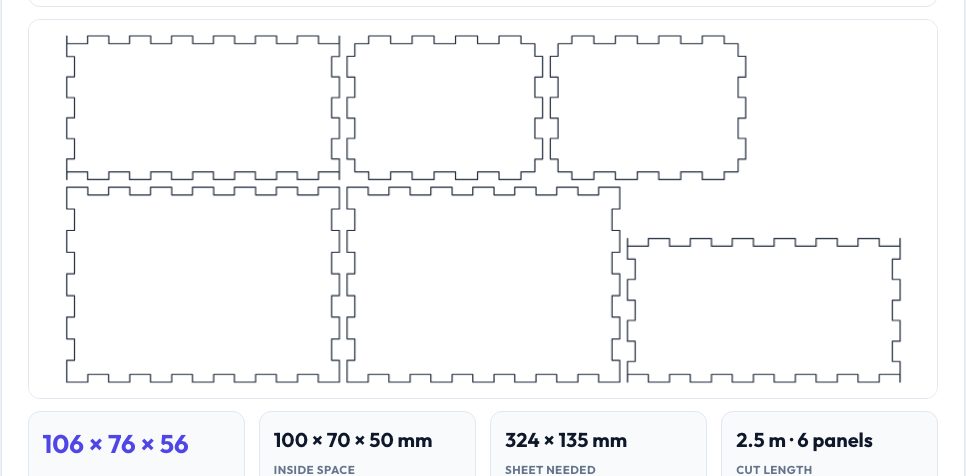
Enter the inside or outside size of your box, the thickness of the plywood, MDF or acrylic, and a finger width, and the generator produces the six panels (or five for an open tray) with finger joints on every edge, laid out on a sheet and ready to export as SVG or DXF at true millimetre scale. The joints are generated with a rule that gives every corner cube to exactly one panel, so the panels interlock without gaps or overlaps — verified by testing the assembled box in 3D.
A kerf setting makes the slots slightly narrower to compensate for the width of the laser beam, so the fingers press-fit snugly; panel names can be engraved on a separate layer. A second tab creates a living-hinge panel — a rectangle with staggered slits that lets plywood or MDF bend around curves, ideal for curved walls, lids and lampshades. Use the output directly in LightBurn, LaserGRBL, Inkscape or any CAD/CAM.
Key features
Closed boxes and open trays
Six or five panels with finger joints on every shared edge.
Kerf compensation
Narrows the slots by your kerf for a snug press fit.
Living-hinge panel
Staggered-slit pattern for bending wood or acrylic.
SVG & DXF at 1:1
Cut lines on a CUT layer and optional engraved names.
How to use it
- Choose inside or outside dimensions and enter W × D × H.
- Set material thickness, finger width and kerf.
- Check the panel layout and the sheet size.
- Download SVG or DXF and load it in your laser software.
Worked example
Example
A 100 × 70 × 50 mm inside box in 3 mm plywood becomes a 106 × 76 × 56 mm outside box with 9 mm fingers; the six panels fit on about a 325 × 135 mm sheet (400 mm wide layout) and the total cut length is about 2.5 m.
Who uses this tool
Makers with a laser cutter
Custom-size boxes without a subscription tool.
Etsy and product sellers
Packaging and gift boxes in any size.
Students
Learn tolerance, kerf and joinery in a hands-on project.
Tips for the best results
- Cut a tiny test box first and adjust kerf (larger kerf = tighter fit).
- Make the finger width at least twice the thickness for strength.
- Use inside dimensions when something must fit in the box.
- For acrylic add glue; for plywood a dab of PVA locks the joints.
Common mistakes to avoid
- Forgetting the material thickness adds to the outside size.
- Using a kerf larger than the real beam width and getting loose joints.
- Cutting the engraving layer at cut power.
Why use AZRS QuickFix?
It is 100% free, needs no signup and has no watermark or usage limits. The tool runs in your browser, so what you type stays on your device, and it works on phones, tablets and desktops. New tools are added every week — bookmark this page or browse the full QuickFix toolbox.
Frequently asked questions
How do the finger joints work?
Each panel is a full-size rectangle with notches; a ranking decides which panel keeps each corner so panels never collide.
What is kerf?
The width of material the laser burns away (about 0.1–0.2 mm). It shrinks parts and widens slots.
Can I make a hinged lid?
Use the living-hinge panel for a curved lid or add hinges after cutting.
Is it private?
Yes — generated in your browser.