Braille Translator
Translate English text to and from Grade 1 Braille Unicode patterns · free, no signup
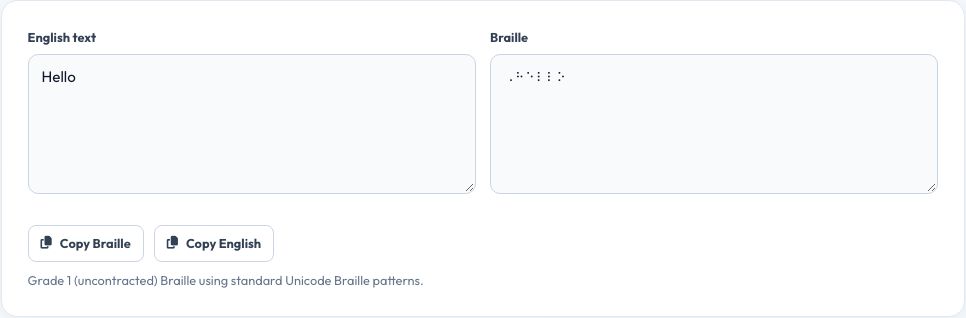
Free Braille Translator (English ⇄ Grade 1 Braille)
Type or paste English text and this tool converts it letter by letter into Grade 1 (uncontracted) Braille, using the standard Unicode Braille patterns so the result can be copied into any document, viewed on a Braille-compatible device, or used to check individual characters against the Braille alphabet while learning it.
It also works in reverse: paste Braille Unicode characters and get the English text back, useful for checking your own Braille writing or reading material typed by someone else. Numbers, basic punctuation and capital letter indicators are handled following standard Grade 1 Braille rules.
Key features
Two-way translation
English to Braille and Braille to English.
Grade 1 (uncontracted) Braille
One-to-one letter mapping, the clearest form for learners.
Numbers and punctuation
Handled with the correct Braille indicator cells.
Copy or download
Export the result as plain text.
How to use it
- Type or paste English text, or paste Braille.
- The translation appears instantly on the other side.
- Copy the result or download it as a text file.
- Use it alongside a physical Braille alphabet chart while learning.
Worked example
Example
“Hello” → ⠓⠑⠇⠇⠕ in Grade 1 Braille Unicode.
Who uses this tool
Sighted people learning Braille
Check translations while studying the Braille alphabet.
Teachers and parents
Prepare simple labelled materials with Braille alongside print text.
Braille learners
Practise reading and writing short words and sentences.
Tips for the best results
- This produces Grade 1 (uncontracted) Braille; Grade 2 Braille used in most professional books adds contractions this tool does not include.
- Use a Braille-compatible font or embosser for physical, tactile output — on-screen Unicode Braille is a visual approximation, not raised dots.
- Cross-check important materials with a qualified Braille transcriber, especially for educational or accessibility use.
- Practise a few words at a time rather than long passages when learning.
Common mistakes to avoid
- Assuming Unicode Braille characters on a screen are the same as an embossed, tactile Braille document.
- Using Grade 1 output where a Grade 2 contracted transcription is expected, such as in many published Braille books.
- Relying on this tool alone for official accessibility documents instead of a certified transcription service.
Why use AZRS QuickFix?
It is 100% free, needs no signup and has no watermark or usage limits. The tool runs in your browser, so what you type stays on your device, and it works on phones, tablets and desktops. New tools are added every week — bookmark this page or browse the full QuickFix toolbox.
Frequently asked questions
Is this Grade 1 or Grade 2 Braille?
Grade 1 (uncontracted) Braille, which maps each letter directly — Grade 2 adds contractions and is not included.
Can I read the output as physical Braille?
The output uses Unicode Braille characters, which display as dot patterns on screen; printing tactile Braille requires an embosser or specialised paper, not just this translator.
Does it handle numbers?
Yes, using the standard Braille number indicator followed by the corresponding letter patterns.
Can I translate Braille back to English?
Yes, paste Braille Unicode characters into the reverse field.
Is this suitable for official accessibility documents?
For informal, learning and labelling use, yes; for official or professional Braille documents, use a certified Braille transcription service.
Is my text stored anywhere?
No, translation happens instantly in your browser and nothing is saved or sent anywhere.