Morse Code Translator
Translate text to Morse code and back, with audio · free, no signup
See Morse Code Translator in action
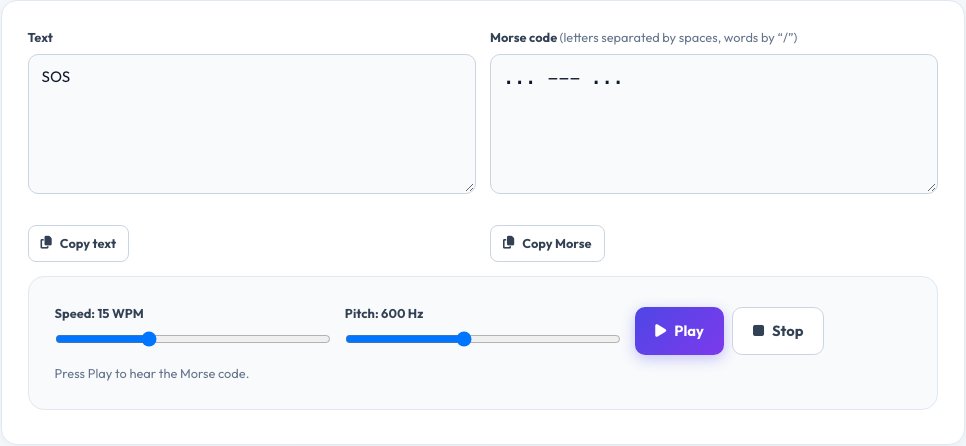
Free Morse Code Translator — Text to Morse and Back, with Sound
Morse code represents each letter and number with a pattern of short signals (dots) and long signals (dashes). Samuel Morse and Alfred Vail developed it in the 1830s and 1840s for the telegraph, and it is still used by radio amateurs, pilots, sailors and in accessibility devices. This translator converts in both directions as you type.
Type normal text to get dots and dashes, or paste Morse (using . and - with spaces between letters and a slash between words) to decode it. Press Play to hear it as audio, and adjust the speed and pitch to practise copying or to send it to a friend.
Key features
Two-way translation
Text to Morse and Morse to text, live as you type.
Audio playback
Hear the code with adjustable speed (WPM) and pitch.
Full character set
Letters, numbers and common punctuation.
Copy and share
Copy the code or the decoded text in one click.
How to use it
- Type text in the top box, or Morse code in the bottom box.
- Read the translation that appears instantly.
- Press Play to hear it, and adjust speed or pitch if you like.
- Click Copy to use it elsewhere.
Worked example
Example
Text:   SOS
Morse:  ... --- ...

Text:   HELLO WORLD
Morse:  .... . .-.. .-.. --- / .-- --- .-. .-.. -..
Who uses this tool
Students and learners
Practise Morse for scouting, radio licences or history projects.
Puzzle and escape-room makers
Hide messages in dots and dashes.
Hobbyists
Prepare messages for lamps, buzzers and tapping signals.
Tips for the best results
- Separate letters with a space and words with a slash (/).
- Start slow — about 10 WPM — and increase speed as you improve.
- Use the audio at a comfortable pitch (around 600 Hz) for copying practice.
- Check your Morse by decoding it back to text.
Common mistakes to avoid
- Running letters together without spaces, which makes the code ambiguous.
- Using unsupported symbols — they are skipped or shown as a question mark.
- Confusing a dash (-) with an underscore or an en dash when pasting.
Why use AZRS QuickFix?
It is 100% free, needs no signup and has no watermark or usage limits. The tool runs in your browser, so what you type stays on your device, and it works on phones, tablets and desktops. New tools are added every week — bookmark this page or browse the full QuickFix toolbox.
Frequently asked questions
What is the Morse code for SOS?
Three dots, three dashes, three dots: ... --- ...
How do I separate words in Morse code?
Use a space between letters and a forward slash between words.
Can I hear the Morse code?
Yes. Press Play to hear it, and set the speed and pitch.
Does it support numbers and punctuation?
Yes, numbers 0–9 and common punctuation such as . , ? ! / ( ) & : ; = + - _ " @.
Is Morse code still used?
Yes — in amateur radio, aviation navigation aids, emergency signalling and assistive technology.
Is this translator free?
Yes, free with no signup, and it works offline once the page has loaded.